What SEO reporting actually means, what a report should include, and how SaaS teams can tie it back to pipeline instead of just traffic.

Founder, Digital Gratified
SEO reporting is the process of turning organic search data into an explanation of performance, business impact, and what to do next. A useful report connects visibility and visits to meaningful actions, then explains what changed and what the team should change in response.
For a SaaS company, that means going beyond a screenshot of improving keyword positions. Are the right people finding the product? Are they becoming qualified prospects or customers? If not, where does the journey break?
Your CEO doesn't need every metric you collected. They need enough evidence to decide whether the work deserves more investment, a different approach, or more time.
What SEO reporting should explain
A dashboard displays numbers. An SEO report interprets them.
It should answer three connected questions: what happened, why it probably happened, and what happens next. Each explanation needs a comparison period, a relevant business goal, and an honest account of what the data can't establish.
Suppose organic visits rise while qualified demo requests fall. Calling that a successful month because traffic increased misses the point. Perhaps an informational article attracted students rather than buyers. Perhaps a form broke. The next action depends on which explanation survives investigation.
Reporting makes your SaaS SEO strategy accountable to those decisions. It isn't a monthly inventory of everything the SEO team did.
SEO reporting vs. SEO analytics
The two terms get used interchangeably, and the confusion costs teams time. SEO analytics is the investigation: querying Search Console, analytics and CRM data to find out what changed and why. SEO reporting is what you hand over afterwards: the findings that matter to a named audience, on a fixed schedule, with a recommendation attached.
You can run analytics every day and still have nothing a CEO can act on, and a report with no analysis behind it is just a set of charts. Do the analysis first, then report only the part that changes a decision.
What a good SEO report includes, in order
Start with traffic and conversions together, connect them to commercial outcomes, and use rankings and technical health to explain the movement. If your team has not yet agreed which numbers count as goals, settle that first with a short list of SEO KPIs that roll up to pipeline.
1. Organic traffic and meaningful conversions
Show organic sessions, relevant landing pages, and the actions visitors take. Separate product, use-case, comparison, and educational pages so a popular blog post doesn't hide weakening product-page performance.
Track demo requests, trial starts, or signups as distinct events. A newsletter subscription can be useful, but it isn't equivalent to someone asking to evaluate your software.
Define the denominator whenever you report a conversion rate. Trial starts divided by organic sessions describes something different from activated trials divided by all trial starts. Keep the definition consistent across periods.
Use Search Console to inspect queries and Google search clicks, and analytics to inspect on-site behavior. Those systems measure different things, so clicks and sessions won't necessarily match. Separate branded and non-branded query trends where possible, while acknowledging that available query data is incomplete.
2. Qualified pipeline and revenue signals
Follow the journey without pretending every stage is revenue:
- Leads: people who share contact details, including people who may never buy.
- Signups or trials: people who begin using or evaluating the product.
- Qualified opportunities: prospects sales has accepted against agreed criteria.
- Pipeline: potential deal value, not booked revenue.
- Customers: accounts that have actually purchased.
- MRR: recurring monthly revenue from those subscriptions, using finance's definition. If the vocabulary is new to your stakeholders, MRR, ARR and retention are core parts of the B2B SaaS revenue model.
Connect captured acquisition information to CRM records where consent and your tracking setup permit. State whether an opportunity is classified by first known touch, opportunity-creation source, or another agreed rule.
Google's explanation of how attribution assigns credit makes an important distinction: attribution distributes credit across touchpoints. It doesn't establish that SEO alone caused the sale. For blog and guide content, where most touches go untracked, use an attribution framework built for content you can't track end to end rather than forcing a single source onto every deal.
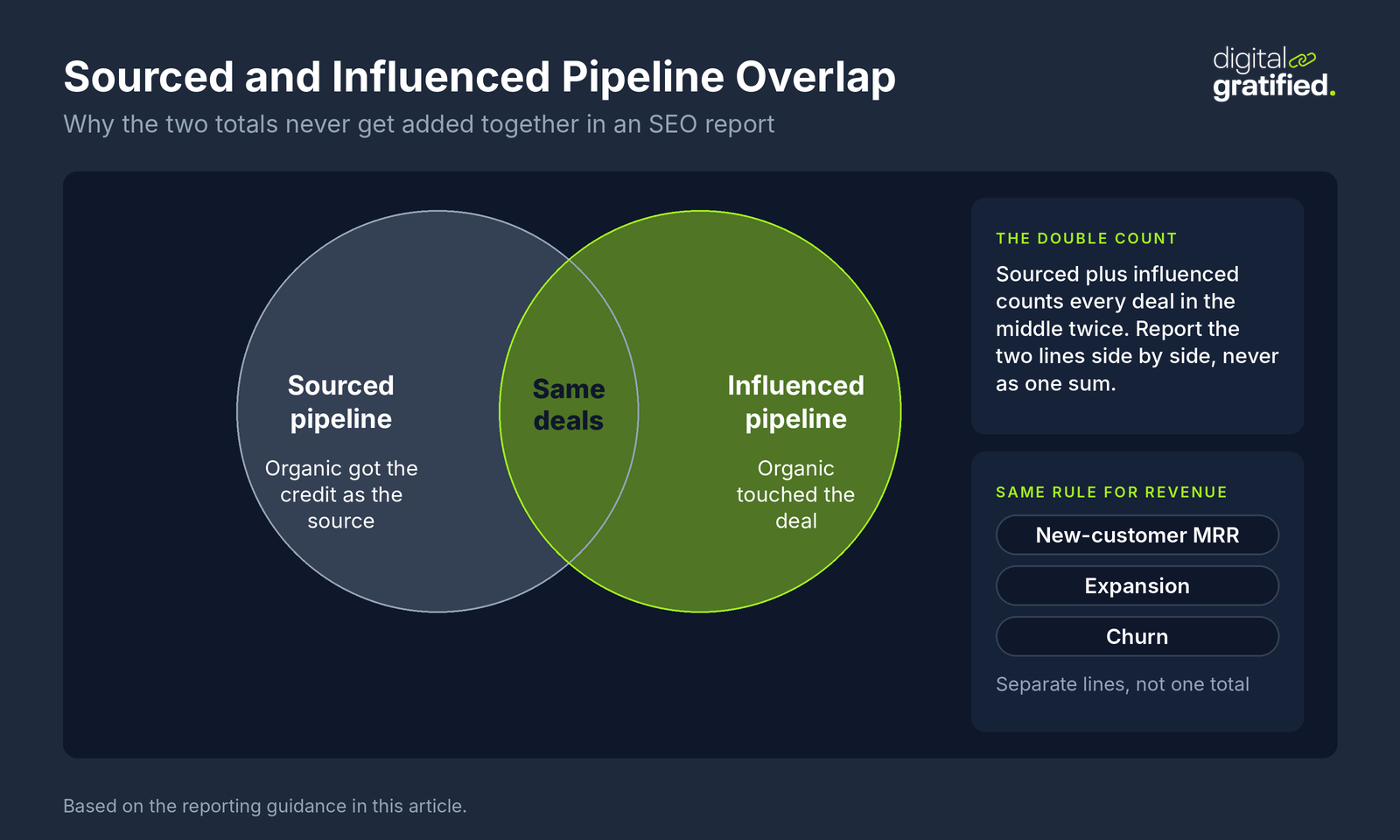
Keep sourced pipeline and influenced pipeline separate. Don't add them together when the same opportunities appear in both. Likewise, new-customer MRR, expansion, and churn belong in separate lines rather than one flattering revenue total.
Compare acquisition cohorts after a similar time to mature. This month's visitors and this month's closed deals usually aren't the same group.
3. Rankings and technical health
Rankings help explain visibility. They aren't the business outcome.
Group tracked queries by buyer intent and page purpose, and by topic cluster if you are building topical authority around your product. Show which commercially relevant pages gained or lost visibility, rather than celebrating an average position across unrelated terms. The cleanest way to set those groups up is grouping B2B pages by buying stage.
For technical health, prioritize changes that affect discovery, indexing, user experience, or conversion. A blocked product section matters more than a large count of low-impact warnings.
Turn findings from technical SEO for SaaS into a short action list: affected pages, likely consequence, owner, and expected resolution date. Label suspected impact as a hypothesis until you have evidence.
How to create an SEO report people use
Agree on the audience and decision before opening a reporting tool. A CEO summary and an analyst's diagnostic appendix shouldn't be the same document.
Build the report in five steps:
- Set the scope. Record the date range, comparison period, countries, site sections, and organic channel definition.
- Validate the inputs. Check event collection, consent changes, form submissions, CRM stage definitions, duplicates, and missing acquisition fields.
- Compare like with like. Use comparable periods and add year-over-year context when seasonality matters. Flag launches, site migrations that change URLs or domains, pricing changes, and tracking changes.
- Explain the biggest movements. Separate observations from hypotheses. Link each claim to the relevant chart or source.
- Assign the response. Finish with actions, accountable owners, deadlines, and the signal that would show improvement.
A compact monthly report can use this structure:
| Section | What to include |
|---|---|
| Executive summary | Outcome against the goal, biggest uncertainty, decision needed |
| Demand and conversion | Organic traffic, landing-page groups, demos or trials |
| Commercial progress | Qualified opportunities, sourced pipeline, closed customers, MRR |
| Diagnosis | Query changes, page performance, technical blockers |
| Next actions | Prioritized work, owner, deadline, expected evidence |
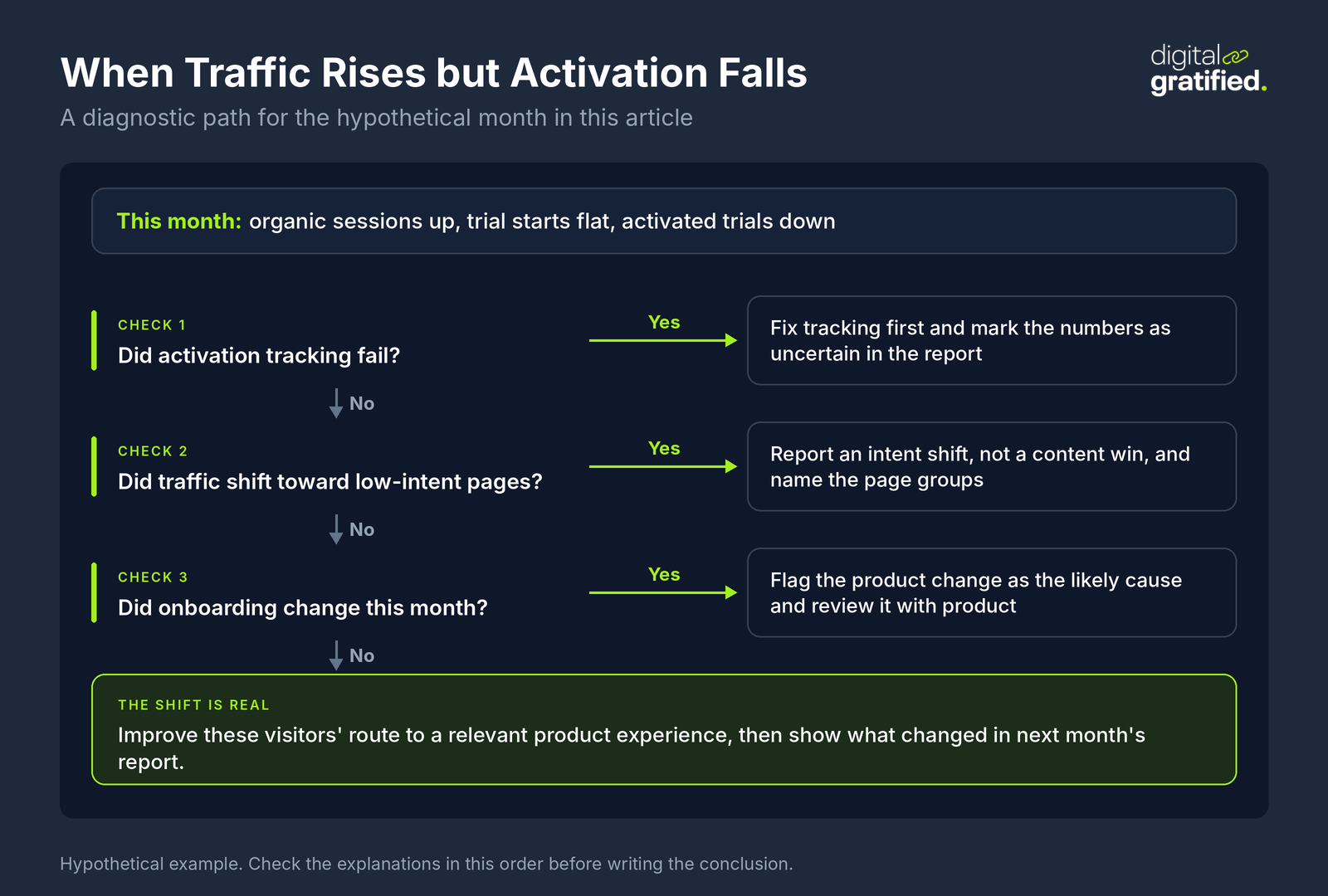
Consider a hypothetical month in which sessions rise, trial starts stay flat, and activated trials decline. The conclusion isn't automatically "write more content." Check whether traffic shifted toward low-intent pages, onboarding changed, or activation tracking failed.
If tracking is sound and the shift is real, the next report should show what happened after the team improved those visitors' route to a relevant product experience.
Include uncertainty plainly: "CRM source coverage is incomplete" is useful information. Filling missing values with confident estimates is not.
Know the limits of each data source
Most arguments about SEO numbers are really arguments between sources that measure different things. State each source's limits once, in the report itself, and the same questions stop coming back every month.
| Source | What it measures | Limits to state in the report |
|---|---|---|
| Search Console Performance report | Clicks, impressions, click-through rate and average position in Google Search, by query and page | Anonymized queries count in chart totals but never appear in the query table, and the table keeps only the most important rows. Dates are in Pacific Time. |
| Search Console branded query filter | The split between branded and non-branded queries | Not available for sites with few impressions, and some queries can be classified wrongly |
| GA4 | Sessions, events and key events on your site | The retention setting, 2 or 14 months on a standard property, limits how far back explorations and funnel reports go; standard aggregated reports are not affected |
| CRM and billing | Opportunities, pipeline, customers and recurring revenue | Only as complete as the source fields captured on forms and the stage definitions sales actually follows |
Two practical consequences follow. Never present the query table as a full list of what people searched: Google's documentation of Performance report dimensions says some queries are omitted to protect user privacy and that the most complete list comes from bulk data exports. And set GA4 retention to 14 months well before you need a year-over-year funnel comparison. Under Google's data retention rules, data past the retention period is deleted automatically each month, and raising the setting later only applies to data that has not been deleted yet.
How AI changes what's worth reporting
AI affects both how people discover your company and how your team prepares the report. Treat those as separate problems.
Measure visibility without calling it revenue
Google says traffic from AI features is included in Search Console within overall Web search reporting.
There's also a newer development worth checking in your account. In June 2026, Google announced dedicated generative AI performance reports, initially rolling out to a subset of websites. The announcement describes impressions and breakdowns by pages, countries, dates, and, for Search, devices.
Don't assume every property has those reports or that an impression report provides AI-specific conversions. Use the fields actually available, record their scope, and avoid adding a subset's impressions to the overall total.
For other AI platforms, distinguish a sampled brand mention, a citation linking to your site, an identifiable referral visit, and a conversion. Those are different observations. A citation can appear without a click, and missing referral information can prevent a visit from being classified correctly.
The reporting side of AI SEO for SaaS should therefore combine visibility observations with verified on-site and CRM outcomes, not collapse everything into an "AI authority" score.
If you monitor prompts, keep a repeatable set of buyer questions and record the platform, date, locale, and sampling method. Present results as observations from that sample, not a census of what buyers see.
Use AI to investigate, not invent explanations
AI can summarize validated tables, suggest anomalies to investigate, and draft commentary. It can also produce a plausible explanation for a change it doesn't understand.
Give it defined metrics and comparison periods. Ask it to distinguish facts from hypotheses and identify missing evidence. Then have the report owner verify calculations, inspect source data, and approve the interpretation.
Don't upload identifiable customer or deal information into unapproved tools. An automated paragraph isn't worth a privacy problem.
Reporting cadence and ownership
Use weekly checks for operational problems: broken tracking, indexing changes, important page declines, or unusual conversion movement. These checks don't need a board presentation.
Produce a monthly report for performance and decisions. Use quarterly reviews to reconsider priorities, budget, and whether enough time has passed to judge commercial outcomes. Compare each quarter with the organic pipeline forecast you agreed at the start, so the review tests assumptions rather than impressions.
Name one report owner, usually the SEO lead or growth marketer. That person owns the explanation, not every underlying system. Marketing operations should validate tracking, sales operations should confirm opportunity definitions, and finance should confirm revenue treatment.
Your SEO team structure should make those responsibilities explicit. Otherwise, the SEO lead can end up defending numbers nobody has agreed how to calculate.
How to share an SEO report
How a report reaches people decides whether it gets read. Put the summary and the decision needed in the message itself, and link to the dashboard for anyone who wants the detail. A PDF of thirty charts attached to an email rarely gets read past page two.
Access needs the same care as the content:
- One Search Console view. The Share button in the Performance report creates a link that grants access only to the current view of the report, not to other pages or to any action on the property. It suits a one-off question from a stakeholder.
- Ongoing Search Console access. Add people as users instead. Google's permission levels run from owner, with full control, to full user, who can view all data and take some actions, to restricted user, with simple view rights on most data. Restricted is enough for most executives; an agency doing the work usually needs full.
- A shared dashboard. In Google's report builder (Looker Studio, documented today as Data Studio), you share a report with "Can view" or "Can edit" access, and you need the owner or editor role to share it at all. Give view access by default, so the definitions behind each chart cannot drift.
If an agency produces the report, keep the accounts in your company's name and add the agency as a user you can remove. The reporting history then stays with you when the relationship ends.
What is the best tool for SEO reporting?
For many lean SaaS teams, the best starting point is a combination: Search Console for Google search performance, GA4 for on-site behavior, your CRM for opportunities, and your billing system for recurring revenue.
A spreadsheet or Looker Studio can present that information. The right choice depends on connector access, refresh requirements, permissions, and who will maintain the definitions.
Add specialist rank tracking or crawling tools when you need deeper diagnostics. Add a warehouse and business-intelligence layer when joining records and maintaining historical definitions becomes too complex for exports.
No dashboard tool can repair missing event data or inconsistent sales stages. Choose the simplest setup that lets someone trace a reported outcome back to its source.
In-house versus agency reporting
The standard shouldn't change with the employment contract.
If you outsource SEO, agree on metric definitions, reporting dates, account access, and who supplies CRM data before the first monthly review. Good SEO client reporting explains missed targets and uncertainty as clearly as progress.
A specialist SaaS SEO agency worth hiring should connect its work to buyer-relevant outcomes without claiming access to revenue evidence it hasn't received. The client still needs to supply reliable qualification and revenue information.
That is the standard we hold our own SaaS SEO and link building reporting to: every month shows what was built, what moved, and what it means for pipeline.
An in-house team needs the same discipline. Familiarity with the business isn't a substitute for documented definitions or a clear recommendation.
Keep the detailed exports available, but put decisions first. Neither a polished deck nor a long task list proves business impact.
The question every SEO report should answer
What should we do next, and what evidence makes that the right decision?
If your report can answer that while showing how organic demand relates to qualified pipeline and recurring revenue, it's doing its job. If it only says traffic went up, you've still got a dashboard to interpret.
Frequently Asked Questions
What is SEO reporting?
SEO reporting turns organic search data into an explanation of performance, business impact and next steps. A useful report connects visibility and visits to meaningful actions such as demo requests and trials, explains what changed, and says what the team should do in response.
What should a monthly SEO report include?
An executive summary against the goal, organic traffic and conversions by landing-page group, qualified opportunities, sourced pipeline and MRR, a diagnosis of query, page and technical changes, and a short list of next actions with owners and deadlines.
How do you connect SEO to pipeline and revenue?
Capture acquisition information on forms, connect it to CRM records where consent allows, and agree a rule for classifying opportunities, such as first known touch. Report sourced and influenced pipeline separately, and compare acquisition cohorts after a similar time to mature.
How often should you report on SEO?
Run weekly checks for operational problems like broken tracking or indexing changes, a monthly report for performance and decisions, and a quarterly review to reconsider priorities, budget and whether enough time has passed to judge commercial outcomes.
How do you share an SEO report?
Put the summary and the decision needed in the message itself and link to the dashboard for detail. In Search Console, the Share button gives access to one report view only; for ongoing access, add stakeholders as restricted users. Share dashboards with view access by default, and keep the accounts in your company's name rather than an agency's.
What is the best tool for SEO reporting?
For most lean SaaS teams, a combination: Search Console for Google search performance, GA4 for on-site behavior, the CRM for opportunities and the billing system for recurring revenue, presented in a spreadsheet or Looker Studio. Add rank tracking, crawling or a data warehouse only when the simpler setup stops being enough.
How should you report AI search visibility?
Keep brand mentions, citations, referral visits and conversions as separate observations. Use the AI performance data Search Console actually provides for your property, record its scope, and present prompt monitoring as a sample, not a census of what buyers see.
About the author
Let's Scale Your SaaS Together
Get a custom SEO and link building strategy tailored for your SaaS business.
Get SEO insights that actually move rankings
Link building tactics, case studies, and SaaS SEO playbooks. No fluff, no spam.
You're subscribed!
SEO and link building insights, straight to your inbox.