Most link reclamation guides start with an outreach list. For SaaS, the fastest wins are the links your own renames and docs moves broke. Here is how to find lost backlinks, fix them in the right order, and stop losing them at every release.

Founder, Digital Gratified
Link reclamation is the work of finding backlinks your site has lost and getting them working again, either by fixing the URL they point to or by asking the linking site to update them. For a B2B SaaS company, our position is that the best reclamation work starts at home: the fastest links to win back are the ones your own team broke when it renamed a feature, moved the docs or merged blog posts, and those can be restored with a redirect before anyone sends a single email.
The guides that rank for this term mostly describe a tool workflow: open a lost links report, filter it, email the site owners. That works, but it skips the question a SaaS team should ask first, which is which lost links touch pipeline. This guide covers what link reclamation is, why links disappear, how to find and sort lost links, how to fix each kind, and how to build reclamation into your release process so you stop losing links in the first place. It is one of the cheapest tactics in link building for a SaaS product, because the links already exist.
What Is Link Reclamation?
Link reclamation means recovering the value of backlinks you already earned. A site once chose to link to you, and something has since broken that link or stripped it of value. Reclaiming it is faster than earning a new link because the editorial decision has already been made.
Lost links fall into two groups, and they need different fixes:
- Links you broke. The linking page is fine and still links to you, but the URL it points to now returns a 404, redirects to the wrong place or sits behind a chain of redirects. You fix these yourself.
- Links the publisher changed. The link was removed, the page was deleted or noindexed, or the whole site went offline. You can only ask, and sometimes you have to let the link go.
Two neighboring tactics often get filed under the same name. Turning an unlinked mention into a link is a related job, covered in our guide to asking writers to link a mention they already made; there the link never existed. And replacing dead pages on other sites with your own goes after links that pointed to someone else. Both are worth doing, but neither restores a link you already had.
Why Backlinks Get Lost
Links decay steadily, whatever you do. In Ahrefs' study of links pointing to 2,062,173 websites, 66.5% of the links found since January 2013 had rotted, another 6.45% had temporary errors and 1.55% had other issues that stopped them counting, so only about a quarter were still passing value. Pages vanish at a similar pace: Pew Research Center found that 38% of webpages that existed in 2013 could no longer be reached a decade later, and that 23% of the news pages it sampled contained at least one broken link.
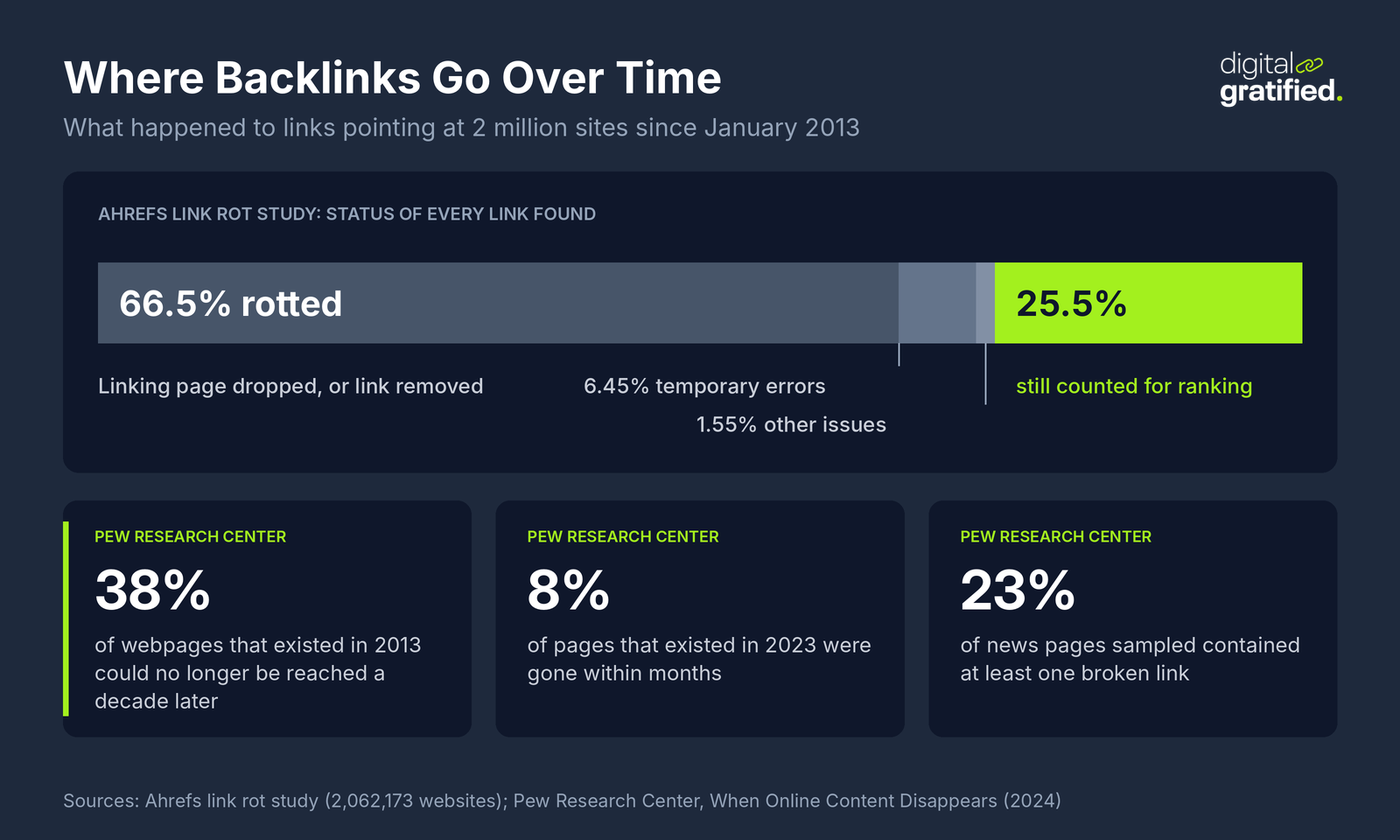
Most of that decay is out of your hands. Publishers prune old posts, sites shut down, and editors swap links during refreshes. Reclamation cannot stop it, and chasing every lost link from a defunct blog is a poor use of time.
How SaaS Sites Break Their Own Links
The share of decay you cause yourself is where SaaS companies lose the most avoidable value, because software sites change their URLs far more often than most businesses. The usual culprits are a product or company rename, a move of help docs to a new platform or subdomain, renamed plans and a rebuilt pricing page, features merged or retired, integration pages restructured when a partner changes its API, blog posts consolidated during a content cleanup, and locale folders added for international pages.
Each of those changes can quietly break links on review sites, partner docs, roundups and journalists' articles. The pages that suffer are usually the ones closest to revenue: integration pages, feature pages and comparison pages, which are exactly the URLs that third parties link to when they recommend you. A rename that ships without a redirect map can undo years of links in one deploy, which is why a full site migration plan treats backlinks as a launch blocker.
Does Link Reclamation Still Work?
Yes, and the redirect side works without anyone's permission. Google's documentation on redirects and Google Search says that for a permanent redirect, "the indexing pipeline uses the redirect as a signal that the redirect target should be canonical." In plain terms, a 301 from the broken URL to its closest replacement tells Google which page should inherit the old one's place.
Google's guide to moving a site with URL changes goes further. It recommends keeping redirects "for as long as possible", generally at least one year, and updating "any high-volume links from other websites to point to the new URLs" by contacting the sites that link to you. That is link reclamation, written into Google's own migration advice.
There is a newer reason to care. AI assistants send people to broken URLs far more often than search does. In Ahrefs' study of 16 million URLs that AI assistants referred visitors to, 1.01% of the URLs clicked from ChatGPT returned a 404, against 0.15% for Google Search, and the average across six assistants was 2.87 times Google's rate. Some of those URLs are pages that used to exist; others are pages the assistant guessed. Either way, they land on your 404 page unless you redirect them.
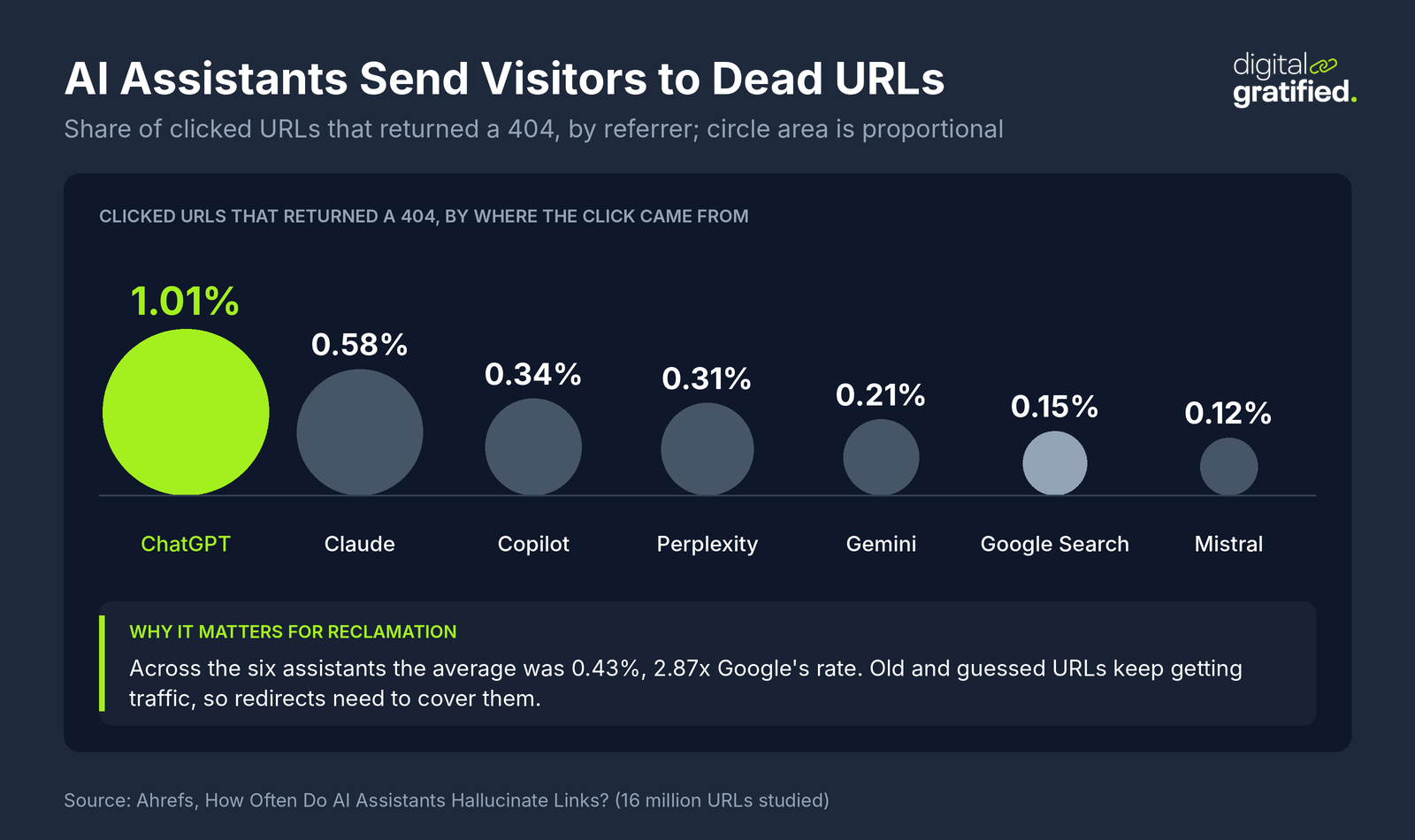
For a SaaS brand, old URLs keep collecting visits from assistants long after you forget them, and those visitors are often buyers asking which tool to use. Redirecting the ones that get traffic is part of showing up when AI assistants answer buyer questions, not just a ranking fix.
How to Find Lost Backlinks
Look in three places, in this order, because the first two produce links you can fix without outreach.
1. Your Own 404 Pages With Backlinks
Start with URLs on your site that return a 404 but still have external links pointing at them. Most backlink tools have a report of "best by links" pages filtered to 404 responses; run it for your domain and sort by referring domains. Search Console's page indexing report also lists "Not found (404)" pages Google has tried to crawl, which catches URLs your backlink tool has not seen. Your server logs and analytics fill the gap for URLs that get visits from AI assistants and old bookmarks but few links.
Every URL on that list with a few referring domains or steady visits needs a destination. This is the highest-value hour of reclamation work you will do.
2. Redirect Chains and Wrong Destinations
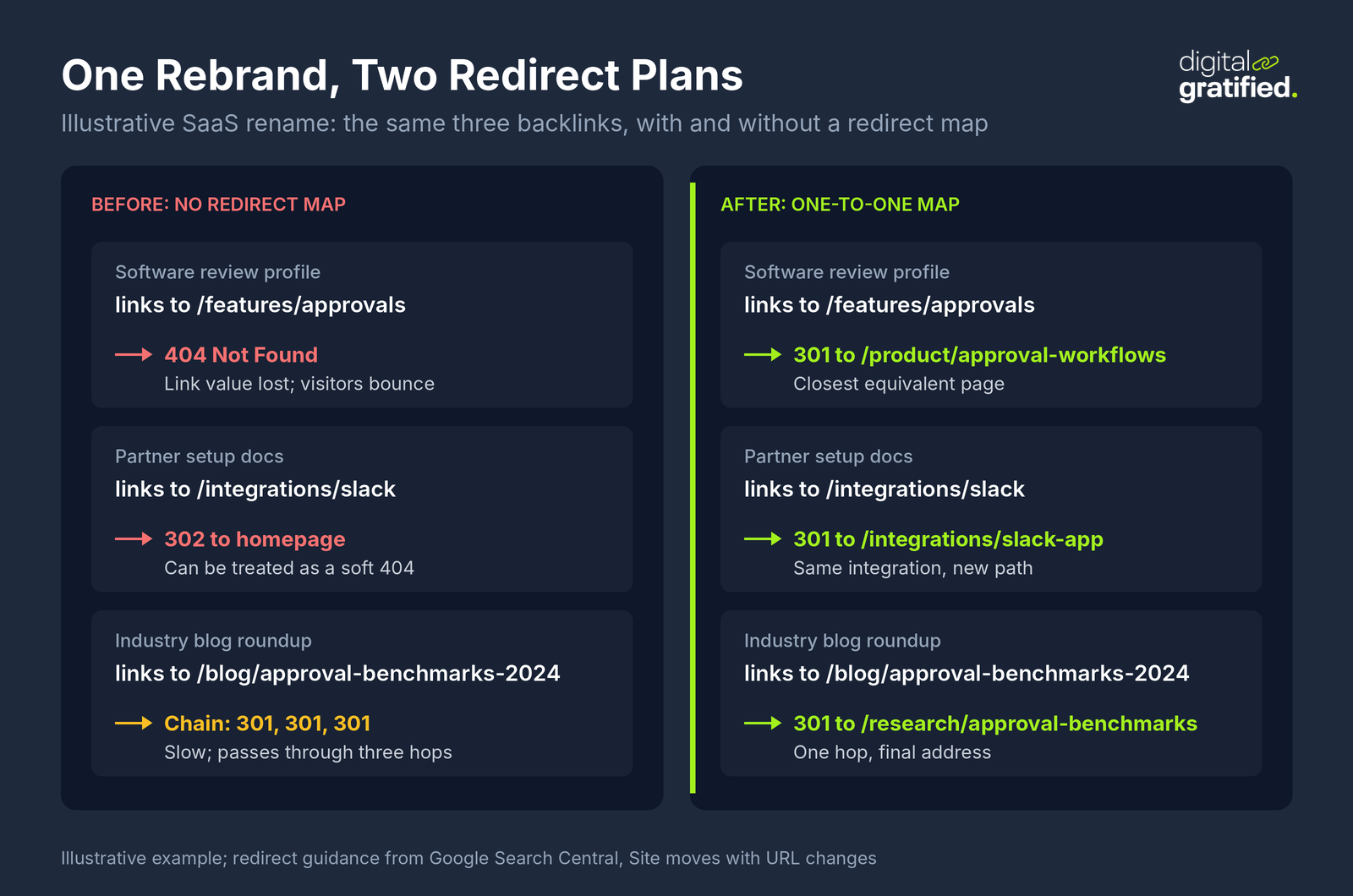
Next, check old URLs that do redirect, because many redirect badly. A link that passes through three redirects after two site rebuilds, or a feature page that now redirects to the homepage, is a link you are only half keeping. Each old URL should redirect straight to its final destination, and sending many old URLs to one irrelevant page such as the homepage can be treated as a soft 404. A crawl of your linked-to URLs, run as part of the crawl checks in a SaaS technical audit, shows both problems.
3. Links the Publisher Removed or Changed
Only then open the lost backlinks report in your link tool. It lists links that disappeared and usually gives a reason: the link was removed from a live page, the page now returns a 404, the page was noindexed, or it redirects elsewhere. Filter to links from pages that had real standing, because most lost links in any report come from scraper sites, expired directories and pages nobody read.
How to Prioritize Lost Links
Not every lost link deserves an hour. Sort them first by what caused the loss, because that decides who can fix it and how likely the fix is to work.
| What happened | Who can fix it | Best fix | Worth pursuing? |
|---|---|---|---|
| Your URL now returns a 404 | You | 301 to the closest equivalent page | Always, if the URL has links or visits |
| Your URL redirects to the homepage or an unrelated page | You | Point the redirect at the closest equivalent page | Yes |
| Your URL sits behind a redirect chain | You | Redirect each old URL straight to the final address | Yes, for linked URLs |
| Publisher removed the link from a live page | The publisher | Short, polite request with the right URL | When the page has standing and readers you want |
| Linking page was noindexed or blocked | The publisher | Mention it only if the noindex looks accidental | Rarely |
| Linking page or whole site is gone | Nobody | Let it go; win a replacement link instead | No |
A Pipeline-First Score for Lost Links
Within the links worth pursuing, rank by what they do for revenue. We score each lost link from 1 to 3 on three questions and add the scores up:
- Standing of the linking page. Does the page that linked to you earn traffic or links of its own? A page that ranks scores 3; a page with no visits and no links scores 1.
- Buyer overlap. Do the people who read that site buy software like yours? A review site or trade publication in your category scores 3; a general blog scores 1.
- Distance from a pipeline page. Where will the restored link land? An integration, pricing, comparison or use case page scores 3; a page one internal link away from one scores 2; an old news post scores 1.
Links scoring 7 to 9 get fixed this week. Links scoring 4 to 6 go into the monthly batch. Anything at 3 is not worth an email. The third question is the one most reclamation guides miss, and it is the one that decides whether a restored link shows up in demo requests. It is also how you start putting a pipeline value on a single link instead of counting links.
How to Reclaim Each Kind of Lost Link
Redirect the URLs You Broke
For every broken URL with links or visits, pick the page that best answers the same need and set a 301 from the old URL to it. An old integration page goes to the new integration page, a retired feature goes to the feature that replaced it, and a merged blog post goes to the post it was merged into. When there is no close equivalent, send it to the most relevant category page, not the homepage.
Keep the redirects for at least a year, and in practice for as long as the old URLs still get links or visits. Point every old URL straight at its final address, and re-check after each later rebuild, because chains form when one migration's redirects point at the next migration's old URLs.
Then update your own site. Internal links still pointing at old URLs waste crawl time and leave redirect hops in place for no reason. Fixing them is also a chance to add internal links that carry authority to commercial pages from the pages that just got their backlinks back.
Ask Publishers to Update Links
For a link that still exists but points at an old URL, even a redirected one, it is worth asking the publisher to update it when the page has real standing. A direct link avoids the redirect hop and survives your next migration. For a link that was removed from a live page, find out why before you write. Pages are often refreshed and the editor swapped in a newer source; if your page is now out of date, update it first and then make the case.
Keep the request short: which page, which link, the correct URL, and one line on why it helps their readers. Partner and customer links are the easiest wins, because you already have a contact who wants the integration or case study to work. If you run these requests at volume, an outreach tool such as BuzzStream, Pitchbox or linkOreach keeps replies and follow-ups in one place; a shared spreadsheet is enough for a few dozen a quarter.
When to Let a Lost Link Go
Let a link go when the page or site is gone, when the publisher removed it on purpose and gave a reason, or when it scores 3 on the pipeline score. Spend that time earning a new link instead; the free links worth chasing for SaaS are often a better use of an afternoon than a fourth email to a site that has moved on.
A Worked Example: Reclaiming Links After a SaaS Rebrand
Here is a worked example with illustrative numbers. A workflow software company renamed its product and rebuilt its site. Six weeks later, demo requests from organic search had dipped, and the team ran the three checks above.
The 404 report found 38 old URLs with external links, pointing from 140 referring domains in total. Most were old feature pages and integration pages that the new site had renamed. A crawl of redirected URLs found 61 more old URLs that redirected to the homepage, including the page linked from the company's three busiest review profiles. The lost links report showed 210 lost links, of which 160 came from scraper and directory sites the team ignored.
The team spent two days on the first two groups: a one-to-one redirect map for the 38 broken URLs and the 61 homepage redirects, and a fix for every internal link still pointing at an old address. It then scored the 50 remaining lost links. Twelve scored 7 or more, mostly partner docs and two review sites, and nine of those publishers updated their links after a short request. The remaining links went into the monthly batch or were dropped.
The useful lesson is the order. Almost all the recovered value came from redirects the team could ship without asking anyone, and the outreach that did happen went only to links that landed near integration and comparison pages.
How Often to Run Link Reclamation
Tie reclamation to your release calendar, not to a quarterly SEO audit. The moment that loses the most links is a deploy that changes URLs, so the cheapest fix is a rule: no URL that has backlinks or organic visits changes without a redirect in the same release. Build the list of linked-to URLs once, keep it next to your sitemap, and check it before every launch, rename and docs move.
Around that rule, run a monthly check of new 404s with links and of the lost links report, and a deeper review each quarter that re-crawls old URLs for chains and homepage redirects. That cadence catches most losses within weeks, while the linking pages still exist and their editors still remember the article.
If you buy or build links, add one more check: confirm each placement is still live and still points at the right URL. Broken link reclamation is part of every SaaS link building campaign we run, and if a link we build is removed within 12 months of placement, we replace it with one of equal or greater authority at no extra cost.
One timing note for this month: Google's November 2026 core update began rolling out on November 10 and may take up to two weeks to complete. Fix redirects now, but wait for the rollout to finish before you read ranking changes as the result of your reclamation work.
The Bottom Line
Treat link reclamation as a release discipline first and an outreach tactic second. The links a SaaS company can win back fastest are the ones its own renames, docs moves and content cleanups broke, and a one-to-one redirect map restores them without a single email. Save outreach for lost links from pages with real standing, read by your buyers, that land near integration, pricing or comparison pages.
Start with your 404s that still have links, fix homepage redirects and chains next, and score everything else on pipeline before you write to anyone. If you want a team to run that alongside new editorial links, talk to us about SaaS link building that protects the links you already have.
Frequently Asked Questions
What is link reclamation in SEO?
Link reclamation is finding backlinks your site has lost and getting them working again. You either fix the URL the link points to, usually with a 301 redirect to the closest equivalent page, or ask the linking site to update or restore the link. It recovers links you already earned, so it is faster than winning new ones.
What is the difference between link reclamation and broken link building?
Link reclamation restores links that pointed to your own site. Broken link building finds dead pages on other sites and offers your page as a replacement for the links pointing at them. Turning an unlinked brand mention into a link is a third, related tactic, because there the link never existed.
How do I find lost backlinks?
Start with pages on your own site that return a 404 but still have external links, using your backlink tool's best by links report and the Not found (404) list in Search Console. Then crawl old URLs that redirect to find chains and homepage redirects. Last, review the lost backlinks report in your link tool and filter it to pages with real traffic or links.
What is 404 link reclamation?
It means fixing backlinks that point at URLs on your site that now return a 404. Set a 301 redirect from each broken URL to the page that best answers the same need, not the homepage, and keep it in place for at least a year. Google may treat mass redirects to the homepage as soft 404s.
Is it worth asking sites to restore removed links?
Only for links from pages with real standing, read by your buyers, that would land near a pipeline page such as an integration, pricing or comparison page. Find out why the link was removed first. If the page was refreshed and your content is out of date, update it before you ask.
How often should a SaaS company run link reclamation?
Check every release that changes URLs before it ships, so no linked page loses its redirect. Then run a monthly check of new 404s with links and the lost links report, and a quarterly re-crawl of old URLs for redirect chains and homepage redirects.
About the author
Let's Scale Your SaaS Together
Get a custom SEO and link building strategy tailored for your SaaS business.
Get SEO insights that actually move rankings
Link building tactics, case studies, and SaaS SEO playbooks. No fluff, no spam.
You're subscribed!
SEO and link building insights, straight to your inbox.