Most SaaS landing page advice is written for ad traffic. Here is how to build the landing pages that rank in search, match each one to a buying stage and judge them on pipeline.

Founder, Digital Gratified
A SaaS landing page is a page built to turn one kind of visitor into one next step: a demo request, a trial or a sign-up. Our position is that most SaaS companies need two different kinds of landing page, and that the rules most guides teach (no navigation, one button, short copy) belong to pages built for paid traffic, not to the pages that rank in search and bring in pipeline for years.
The results that rank for this term are mostly galleries of attractive hero sections. They are useful for design ideas, but they skip the questions a founder or head of growth has to answer: which landing pages to build first, how a page that ranks differs from a page that converts ad clicks, what goes on each one, and how to tell whether it produces demo requests. Landing pages are the conversion layer of the wider SaaS SEO system that turns rankings into ARR, so the advice here assumes you care about pipeline, not pageviews.
What Is a SaaS Landing Page?
Any page a visitor lands on first is technically a landing page, but in SaaS marketing the term means a page built around a single offer and a single action. The homepage speaks to everyone; a landing page speaks to one visitor with one problem and asks them to do one thing.
That definition hides a split that matters more than any design choice. Some landing pages exist to catch traffic you pay for or send yourself: ads, emails, webinars, events, partner campaigns. Others exist to be found: a buyer types "your category + Salesforce integration" or "alternatives to a competitor" into Google or an AI assistant, and your page is the answer. We call the first kind campaign pages and the second kind search landing pages. They share a goal, and almost nothing else.
Campaign Pages vs. Search Landing Pages
Most published advice on SaaS landing pages describes campaign pages, because that is where most landing page tools and benchmark data come from. In a manual review of 200 SaaS pages built in its own builder, Unbounce found that 91% had no top navigation and 73% had a single call to action, 72% used a form, and the average form had four to five fields. That is sound practice for a page receiving paid clicks: every link off the page is money leaking out.
A page you want to rank works under different constraints. It has to answer a query well enough to beat other pages, which takes more depth than a 300-word ad page. It sits inside your site, so it needs navigation and internal links. And its visitors arrive at different stages: some are ready to talk to sales, others are still comparing tools and will leave if the only option is a demo form.
| Factor | Campaign landing page | Search landing page |
|---|---|---|
| Where visitors come from | Ads, email, events, partner campaigns | Google, Bing and AI assistants |
| Lifespan | Weeks, tied to a campaign | Years, improved over time |
| Navigation | Removed | Kept, with links to related pages |
| Length | Short; the ad did the persuading | Long enough to answer the query fully |
| Indexing | Usually noindex | Indexed, in the sitemap, linked internally |
| Calls to action | One | One primary, plus a lighter option for earlier stages |
| Judged on | Conversion rate per campaign | Qualified demos and pipeline over quarters |
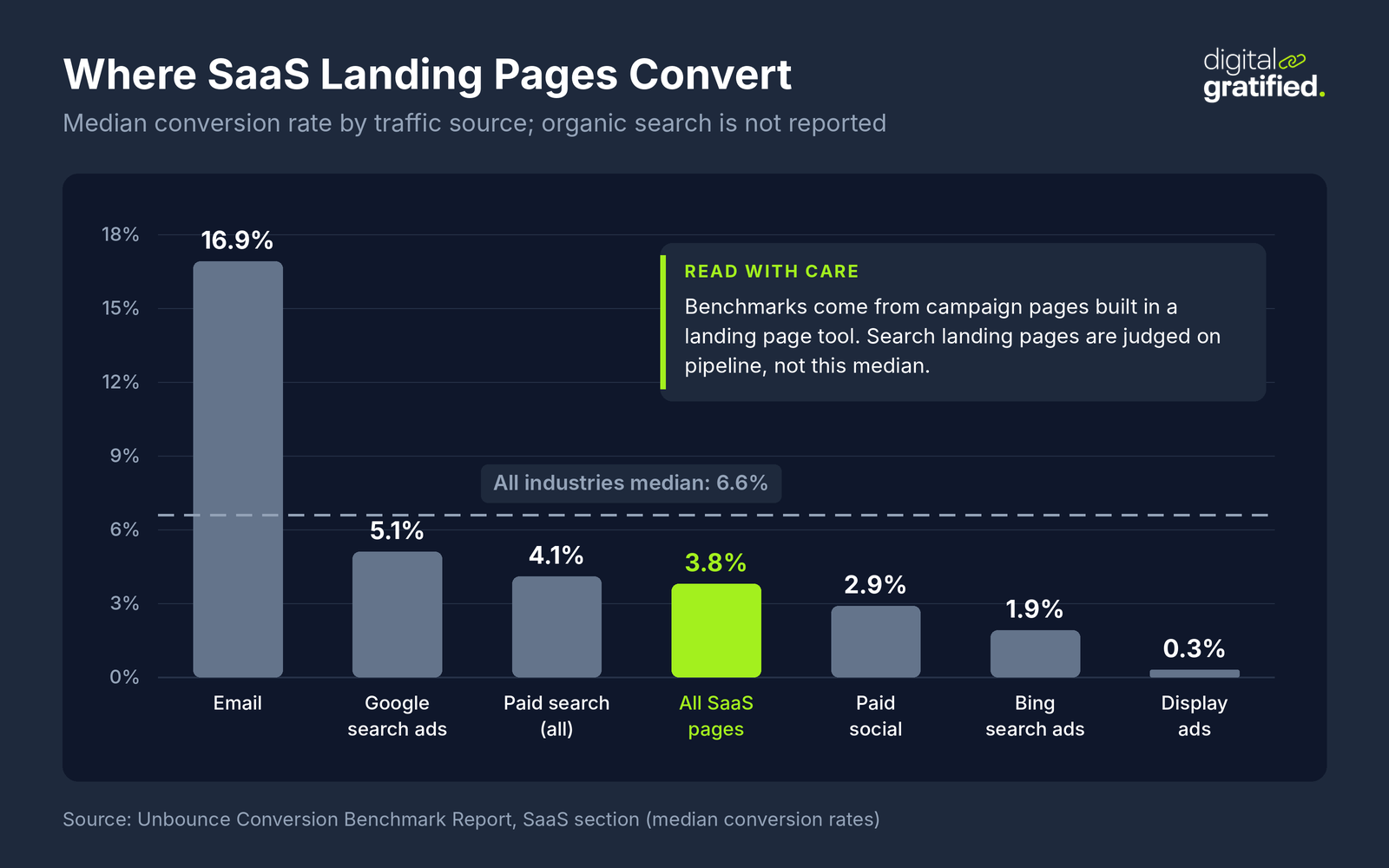
The benchmark numbers most teams quote come from the first column. Unbounce's SaaS conversion benchmarks put the median SaaS landing page at 3.8%, against 6.6% across all industries, with large differences by traffic source and no figure at all for organic search. A search landing page will usually convert below an email landing page and still be the better asset, because nobody has to pay for its next thousand visitors.
Two practical rules follow. Keep campaign pages out of the index with a noindex tag, so a stripped-down ad variant does not compete with the page you want to rank. Leave those pages crawlable: if robots.txt blocks a page, the crawler never sees its noindex rule, and the page can still appear in results. And never copy a campaign page's layout onto a page you want to rank, however well it converts.
The SaaS Landing Pages That Rank and Convert
The search landing pages that create pipeline for software companies follow the buying journey. Each type answers a different question, from a buyer at a different stage, and needs a different next step. Which of them to build first depends on mapping B2B searches to buying stages; here is what each one needs to do as a landing page.
Comparison and Alternatives Pages
A buyer searching "your product vs a competitor" or "alternatives to a competitor" has a shortlist and is close to a decision. These pages earn their place with an honest comparison: where each product is stronger, who each one suits, pricing models side by side, and what switching involves. The call to action can be direct (a demo or trial), with a migration guide or switching offer as the second option.
Integration Pages
Searches for "your category + a platform the buyer already uses" come from people who have a stack and want to know whether you fit it. An integration page should say what syncs, in which direction, how often, what setup takes, and which plan includes it. These pages are close to unique to SaaS, they convert well because the visitor already uses a tool you connect to, and they are often the easiest commercial pages to rank because the competition is a thin partner directory listing.
Use Case and Industry Pages
A buyer searching for a job to be done ("software for running calibration meetings") or for a tool in their industry needs to see their situation described in their own words. A use case page works when it shows the workflow before and after, names the roles involved, and proves it with a customer example from the same situation.
Feature and Pricing Pages
Feature pages rank for capability searches and pricing pages for "your brand + pricing" queries, so both are landing pages whether you treat them as such or not. A pricing page that hides every number behind "contact sales" loses buyers who are comparing costs; if you sell on custom contracts, give ranges, the factors that move the price, and a clear route to a quote.
Free Tools and Templates
Calculators, generators and templates rank for problem searches earlier in the journey and earn links that other landing pages cannot. They are landing pages for a sign-up rather than a demo: let the visitor use the tool, then offer the product as the way to do the same job at scale. The authority they collect should flow on to commercial pages through internal links from guides to the commercial pages they support.
What Every SaaS Landing Page Needs
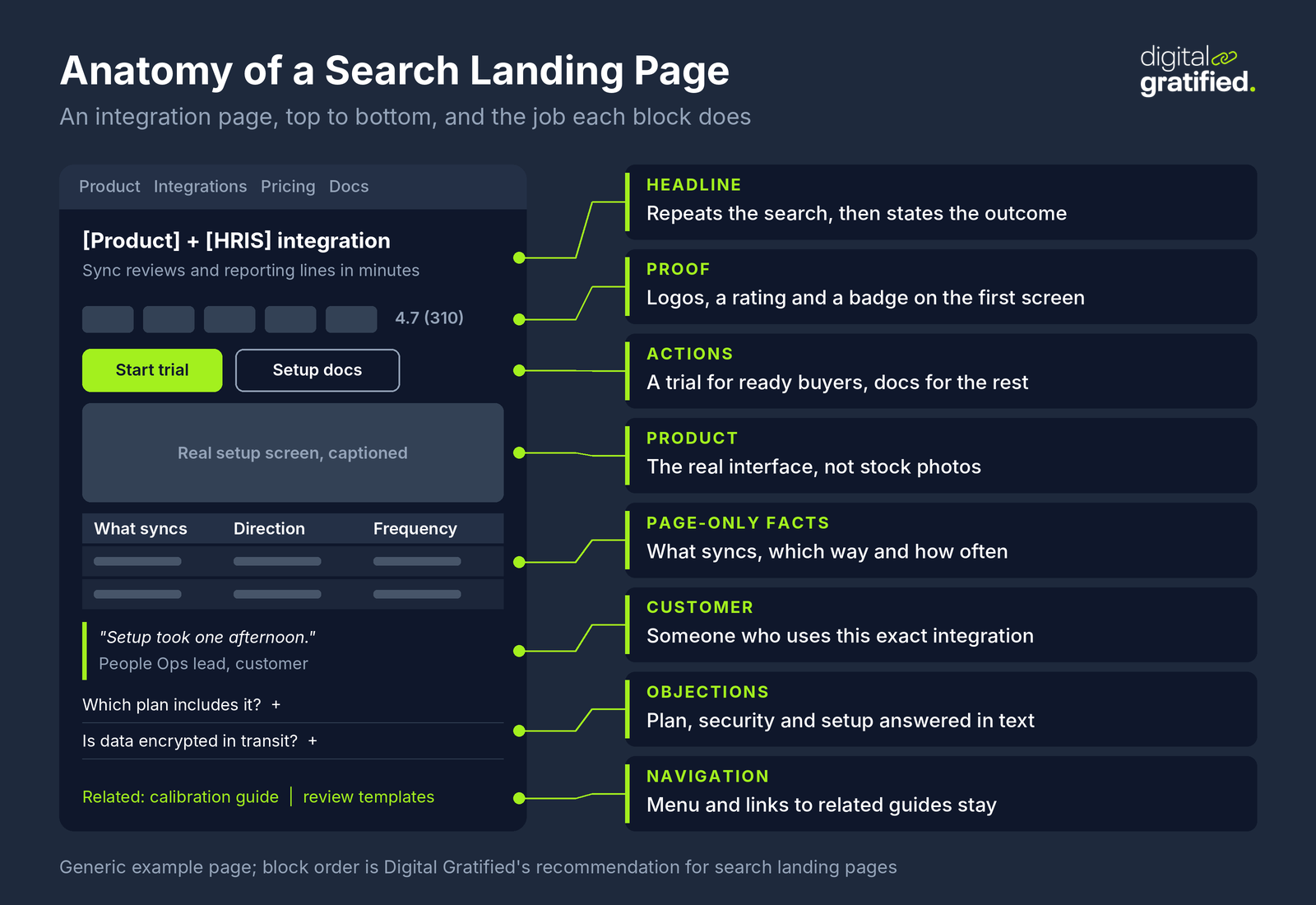
The annotated example below shows how these elements sit on an integration page, top to bottom. The order matters as much as the elements: a search visitor decides within the first screen whether the page answers their query, so the proof and the answer come before the long explanation.
A Headline That Matches the Search
The H1 should repeat the words the visitor searched, then say what changes for them. "CRM software" is a category label; "Close deals from your inbox, with a CRM your sales team will use" is a promise. For a search landing page, put the query terms in the first half of the headline and the outcome in the second, and match the title tag to it so the result in Google and the page agree.
Copy Written at the Buyer's Level
Plain copy converts better. In the benchmark data above, SaaS pages written at a fifth to seventh grade reading level converted at 12.9%, while pages written at a professional level converted at 2.1%. That does not mean dumbing down a technical product; it means short sentences, concrete nouns and the words buyers use on sales calls instead of the words used in your positioning document. Pull those words from call recordings and support tickets.
Proof Near the Top
B2B buyers are risk averse, so proof belongs on the first screen, not at the bottom. A customer logo strip is the minimum. Better is a specific result from a named customer in the visitor's industry, a security badge for the IT reviewer, or a review score with its count. Only 54% of the 200 pages in the review cited earlier used a testimonial at all, which is an easy gap to close.
The Product Itself
Show the real interface doing the job the page describes, with a caption that explains what the visitor is looking at. Stock photos of smiling teams tell a software buyer nothing. A short walkthrough video can replace several paragraphs for a complex workflow, as long as the page still works without it.
Answers to Objections
Every SaaS sale stalls on the same few objections: price, setup time, data migration, security and integration with existing tools. A search landing page has room to answer them in its body and in a short FAQ section, which also helps it match the follow-up questions buyers type into search and AI assistants. A campaign page usually has to leave them for the sales call.
Speed, and a Page That Renders for Crawlers
The Core Web Vitals thresholds are a Largest Contentful Paint of 2.5 seconds or less, an Interaction to Next Paint of 200 milliseconds or less and a Cumulative Layout Shift of 0.1 or less, measured at the 75th percentile of real visits. Heavy hero videos, chat widgets and tag managers are the usual culprits on SaaS pages. Check too that the copy is in the HTML the server sends, not injected by a JavaScript framework after load, as part of the rendering and indexing checks for SaaS templates you run on every release.
Match the Call to Action to the Buying Stage
The single-button rule is right for a campaign page and too blunt for a search landing page. A visitor who found your comparison page is often ready for a demo. A visitor who found your template page is not, and a demo form is the only thing between them and the back button. Give each search landing page one primary action that fits its stage and one lighter action for visitors who are not there yet:
- Comparison, alternatives and pricing pages: demo or trial as the primary action, a migration guide or pricing calculator as the secondary.
- Integration and use case pages: trial or demo as the primary action, setup documentation or a recorded walkthrough as the secondary.
- Templates and free tools: the tool itself first, a sign-up to save or share the result second, and a demo only for visitors who return.
Keep forms short for early stages, and send most search landing pages to a sign-up if you are product-led. Whatever you choose, record which page each demo request and sign-up came from, because that is the only way to judge the page later.
How to Build SaaS Landing Pages That Rank
A search landing page needs the same things any page needs to rank, applied to commercial intent. Start from the queries your buyers use at each stage, check what currently ranks for them, and build a page that answers the query better and more specifically than the pages already there. If the results are all comparison articles, a product page will not rank; build the comparison.
Scale is where SaaS teams get into trouble. Integration and industry pages invite templating: one layout, a hundred partner names swapped in. Google's spam policies describe doorway abuse as pages "created to rank for specific, similar search queries" that lead users to intermediate pages that are less useful than the final destination, and scaled content abuse as many pages generated "for the primary purpose of manipulating search rankings and not helping users". An integration page that only swaps a logo and a name is that kind of page. Each one needs content that is true only of that integration: what syncs, the setup steps, the limits, and a customer who uses it.
Two more checks keep landing pages ranking. Link to them from the guides and blog posts that cover the problems they solve, so they inherit authority and get crawled. And when a redesign is moving landing pages to new URLs, treat it as a migration with a redirect map, not a design task. If you sell in several markets, the same rules apply to localized landing pages for new markets, where translated templates with no local proof perform poorly.
This is the kind of work we do for SaaS clients: technical audits, buyer-intent keyword maps and content built around how software buyers search. When we plan SaaS SEO for commercial landing pages, we map every page to a buying stage and a conversion path before anything is written.
SaaS Landing Pages and AI Search
Buyers increasingly meet your landing pages second, after an AI assistant has already summarized them. In G2's survey of 1,076 B2B software buyers, 51% now start research with an AI chatbot more often than with Google, and 69% chose a different vendor than they first planned because of a chatbot's recommendation. G2 sells visibility products, which gives it a stake in that finding. Clicks are shrinking on the informational side too: an AI Overview correlates with a 58% lower click-through rate for the top-ranking page, comparing December 2023 with December 2025 across 300,000 keywords.
For landing pages, that shifts the job in three ways. First, state the facts an assistant needs in plain text on the page: who the product is for, what it integrates with, starting price or pricing model, and how it differs from named alternatives. Facts locked in images, tabs or PDFs are easy to miss. Second, keep those facts the same across your pricing page, comparison pages, review profiles and partner listings, because assistants piece answers together from all of them. Third, visitors who arrive from an AI answer have already read a summary, so get them to proof and the next step quickly. The same work decides how SaaS products get named in AI answers more broadly.
Search itself keeps moving. Google's November 2026 core update started rolling out on November 10 and may take up to two weeks to finish, so wait for it to complete before reading anything into landing page ranking changes this month.
A Worked Example: Integration Pages for an HR Software Company
Here is a worked example with illustrative numbers. An HR software company that sells performance review tools has one generic "Integrations" page listing 30 logos, and its demo requests from organic search come almost entirely from the homepage. Search Console shows 40 queries a month combining its category with an HRIS platform name, but the generic page ranks for none of them.
The team builds five integration landing pages for the HRIS platforms most of its customers use. Each page states what syncs (employee records, reporting lines, review cycles), in which direction and how often, shows the setup screen, links to the setup documentation, and quotes a customer who uses that integration. Each page has a trial as the primary action and the documentation as the secondary one, and the performance review guides on the blog link to the matching integration pages.
Two quarters later the team compares the five pages with the old generic page on one measure: qualified demo and trial requests by landing page, from the CRM. If the new pages produce requests, the next five integrations get pages; if not, the team checks rankings, then the call to action, before building more. In a small category like this, the trade press matters too, which is why HR software link building usually supports pages like these.
How to Measure a SaaS Landing Page
Judge a campaign page on its conversion rate within the campaign. Judge a search landing page on what it contributes over quarters, using four numbers:
- Non-branded clicks from Search Console for the queries the page targets.
- Conversions by landing page: demo requests, trials or sign-ups that started on that page, from your analytics or CRM, not a tool estimate.
- Qualified rate: the share of those conversions that sales accepts or that activate in the product.
- Pipeline and revenue from opportunities whose first touch was that page.
Compare page types against each other, not against an industry median built mostly on paid traffic. A comparison page converting at, say, 1.5% that produces qualified demos every month is worth more than a template page at 8% whose sign-ups never activate. Report these alongside the other KPIs that connect organic visits to pipeline, and set the targets in an SEO strategy that starts from a pipeline target.
The Bottom Line
Build two kinds of SaaS landing page and stop using one set of rules for both. Campaign pages get the stripped-down ad treatment and a noindex tag. Search landing pages (comparisons, alternatives, integrations, use cases, pricing and free tools) get depth, navigation, proof near the top and a call to action that fits the buyer's stage. Start with the pages closest to a purchase, give each one content that is true only of it, and judge them on qualified demos and pipeline after two quarters.
If you would like help deciding which landing pages to build first, talk to us about our SaaS SEO services.
Frequently Asked Questions
What is a SaaS landing page?
A SaaS landing page is a page built to turn one kind of visitor into one next step, such as a demo request, a trial or a sign-up. Campaign landing pages receive paid or emailed traffic for a few weeks; search landing pages, such as comparison, integration, use case and pricing pages, are built to rank and bring in buyers for years.
What should a SaaS landing page include?
A headline that repeats what the visitor searched and states the outcome, proof on the first screen, the real product interface, answers to the usual objections (price, setup, security, integrations), one primary call to action that fits the buyer's stage, and a page that loads fast and renders its copy in the HTML.
What is a good conversion rate for a SaaS landing page?
Unbounce's benchmark data puts the median SaaS landing page at 3.8%, against 6.6% across all industries, with email traffic far higher and display ads far lower. Those figures come from campaign pages. Judge a search landing page on qualified demos and pipeline over quarters rather than against that median.
Should a SaaS landing page have navigation?
A campaign page for paid traffic usually should not, because every exit link costs money. A page you want to rank in search should keep its navigation and internal links, because it sits inside your site, needs crawl paths and authority from related pages, and serves visitors at different stages.
Should landing pages be indexed by Google?
Index the search landing pages you want to rank, and add a noindex tag to short-lived campaign and ad variants so they do not compete with them. Leave noindexed pages crawlable: if robots.txt blocks them, Google never sees the noindex rule.
How many landing pages does a SaaS company need?
Start with the pages closest to a purchase: comparison and alternatives pages for your main competitors, integration pages for the platforms most customers use, and use case pages for your core jobs to be done. Add more only where each page can carry content that is true of it alone, not a template with a name swapped in.
How long should a SaaS landing page be?
Campaign pages can be short because the ad did the persuading. A search landing page needs to be long enough to answer the query better than the pages already ranking, which usually means a full comparison, the integration details or the workflow, plus proof and objections.
About the author
Let's Scale Your SaaS Together
Get a custom SEO and link building strategy tailored for your SaaS business.
Get SEO insights that actually move rankings
Link building tactics, case studies, and SaaS SEO playbooks. No fluff, no spam.
You're subscribed!
SEO and link building insights, straight to your inbox.