An SEO migration is a revenue event, not an IT ticket. Here is how risky each type of move is, how long recovery really takes, and how to rank URLs by pipeline so the pages that produce demo requests survive the move.

Founder, Digital Gratified
An SEO migration is any change to your site's domain, URLs, platform or templates that forces Google to re-crawl and re-evaluate pages it already ranks. For a SaaS company, treat it as a revenue event, not an IT ticket: protect the pages that produce demo requests first, change one thing at a time, and judge the move by organic pipeline rather than by whether traffic "came back".
That position matters because the numbers on migrations are sobering. In the largest recent dataset, the median domain migration needed about ten months to win back its old organic traffic, and roughly one in seven had not recovered after three years. Most of those losses trace back to decisions made weeks before launch day. This guide covers the migration types and their risk, realistic recovery times, a redirect map ranked by pipeline, the launch checklist, and what changes when the site belongs to a B2B software company. It is one piece of a complete SaaS SEO playbook, and the piece where mistakes cost the most.
What Is an SEO Migration?
A site migration is the project: a new domain, a new CMS, a redesign. The SEO migration is the part of that project that keeps search visibility intact. It means mapping every old URL to its new home, carrying over the signals Google uses to rank each page, and monitoring until the new URLs replace the old ones in the index.
Google's site move documentation reduces the process to five steps: review best practices, prepare and test the new site, map old URLs to new ones, switch on redirects, then monitor traffic on both sets of URLs. The steps are simple. The risk sits in how much changes at once. The same page tells site owners to change only one thing at a time and warns that "with any significant change to a site, you may experience ranking fluctuations." Googlebot has to visit every URL on the old and the new site at least once before a move is complete, so a SaaS site with 5,000 URLs of blog archives, docs and changelogs settles far more slowly than a 200 page marketing site.
Types of SEO Migrations and How Risky Each One Is
Migrations differ in how much Google has to re-learn. The tool requirements below come from Google's documentation; the risk ratings are our own judgement.
| Migration type | What changes | Change of Address tool | Risk to rankings |
|---|---|---|---|
| HTTP to HTTPS | The protocol of every URL | Not needed | Low |
| www to non-www, or the reverse | The hostname variant | Not needed | Low |
| Platform or CMS move with the same URLs | Templates, code and rendering | Not needed | Medium: titles, internal links and rendering often change even when URLs do not |
| URL structure change on the same domain | Paths, such as /blog to /resources | Not needed | Medium to high, depending on how many ranking URLs move |
| Subdomain to subfolder (blog.example.com to example.com/blog) | Hostname and path | Not usable: the tool works on whole domains, not paths | Medium to high |
| Domain change (rebrand, new TLD, merger) | Every URL | Yes, for every verified variant of the old domain | High |
| Domain change plus redesign plus content cuts | Everything at once | Yes | Highest: nobody can tell which change caused a drop |
The last row is where SaaS teams end up most often, because a rebrand rarely ships alone. A new name brings a new domain, the new domain brings a new site build, and the new build looks like "a good time" to prune the blog. Each decision is defensible on its own. Shipping all three on the same day makes the outcome impossible to diagnose. Where you can, move the domain first with the old templates and content intact, then redesign, then prune, with a few weeks of stable data between each step.
How Long Does an SEO Migration Take to Recover?
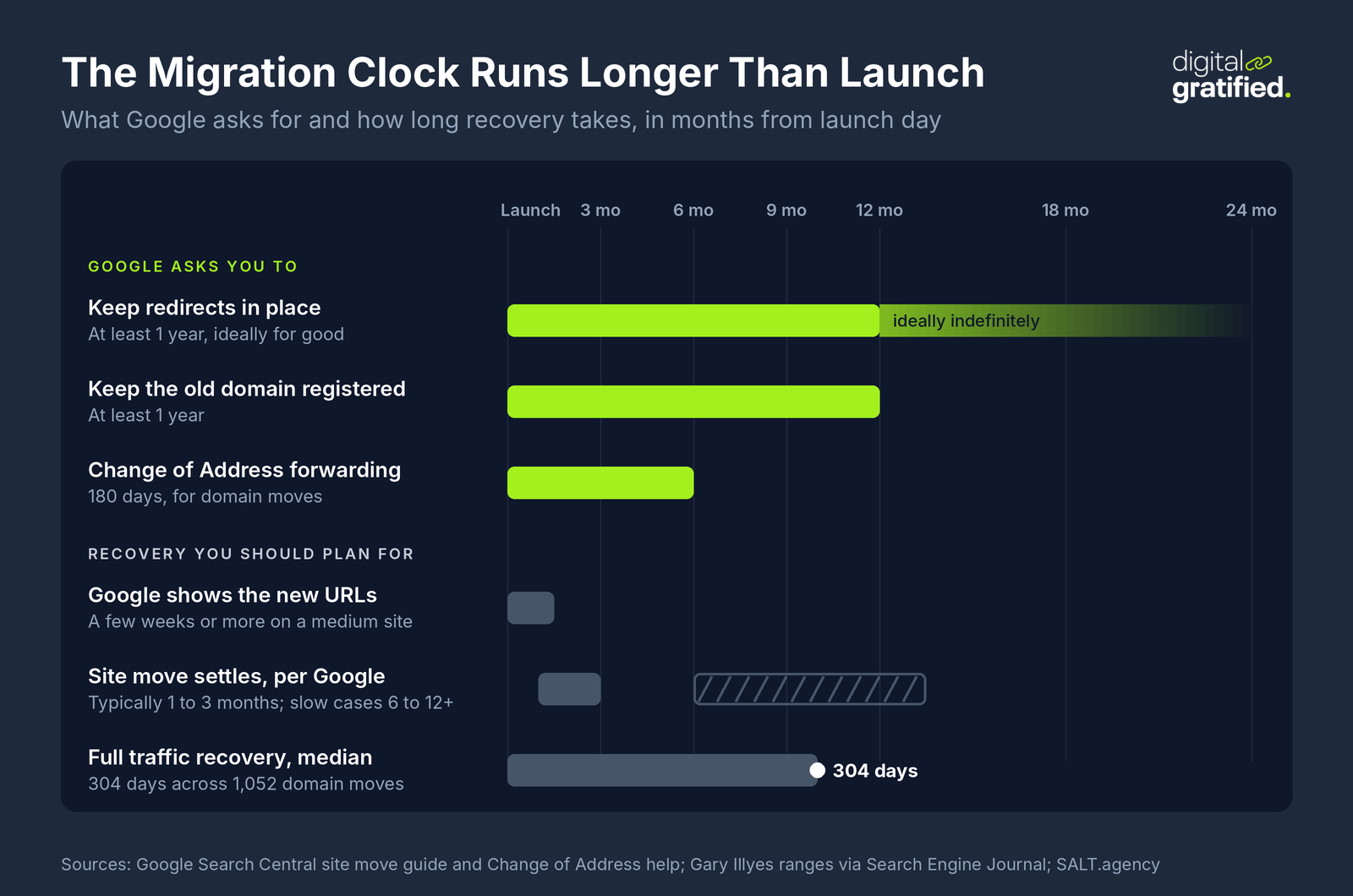
Longer than most project plans allow. Google's documentation says that for a medium-sized site "it can take a few weeks or more" before Google starts showing the new URLs. At Search Central Live in Barcelona, Gary Illyes showed typical timing ranges that put site moves at one to three months, with the slowest cases running from six months to more than a year, according to an attendee recap reported by Search Engine Journal.
Independent data is less forgiving, because it measures full traffic recovery rather than Google picking up new URLs. Two datasets compiled by the same researcher, Dan Taylor, compared each new domain's organic traffic with the old domain's baseline:
| Dataset | Domain migrations | Time to recover | Not recovered |
|---|---|---|---|
| SALT.agency, 2026 | 1,052 | Median 304 days; mean 489 days; 22.8% recovered by day 90 and 59.5% by day 365 | 13.9% after 3 years |
| Search Engine Journal, 2025 | 892 | Average 523 days | 17% after 1,000 days |
The gap between the median and the mean tells the real story. Recovery is not a bell curve around a typical answer; it splits into migrations that bounce back within a quarter and a long tail that takes more than a year. The 2026 dataset does not test which practices caused the difference, so treat it as a measure of how long recovery takes, not a verdict on why.
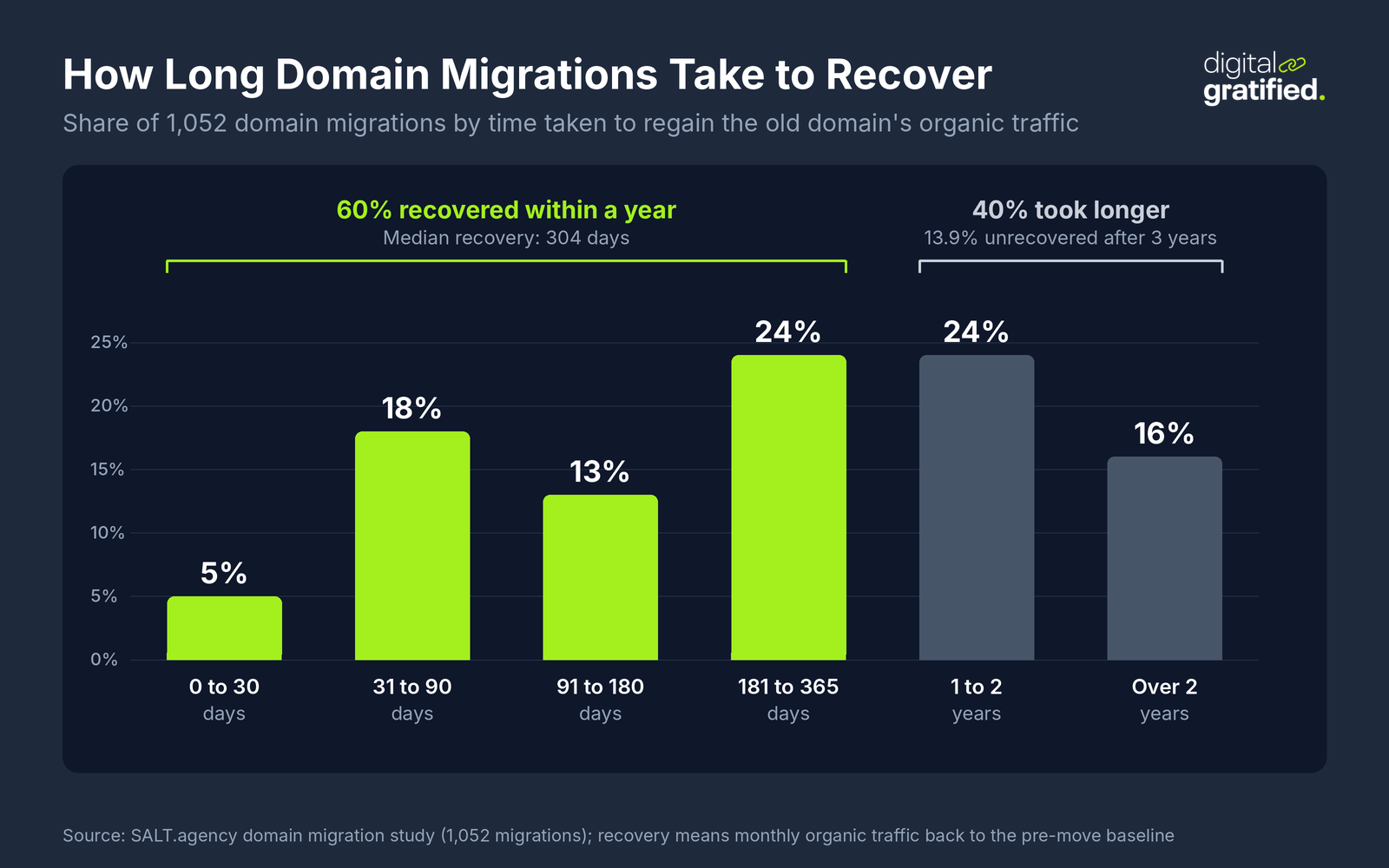
Two conclusions follow for a SaaS team. First, budget for the dip: put a recovery window into your SEO forecast for the year, so a soft quarter of organic demo requests is a planned cost rather than a surprise in a board meeting. Second, correct redirects do not guarantee recovery. Search Engine Roundtable described a site that moved domains at the start of 2026, saw the new domain indexed by April, and four months later watched more than 5,000 new pages fall out of the index while the old domain reappeared. John Mueller's answer was that "sometimes things just take a particularly long time to be fully processed." Thin pages that ranked on the strength of an old, trusted domain do not always survive the move.
Why SEO Migrations Lose Traffic
Redirects get the blame, and they cause plenty of damage. In our experience, though, the bigger losses usually come from the changes nobody thought of as SEO changes.
Redirects That Point to the Wrong Place
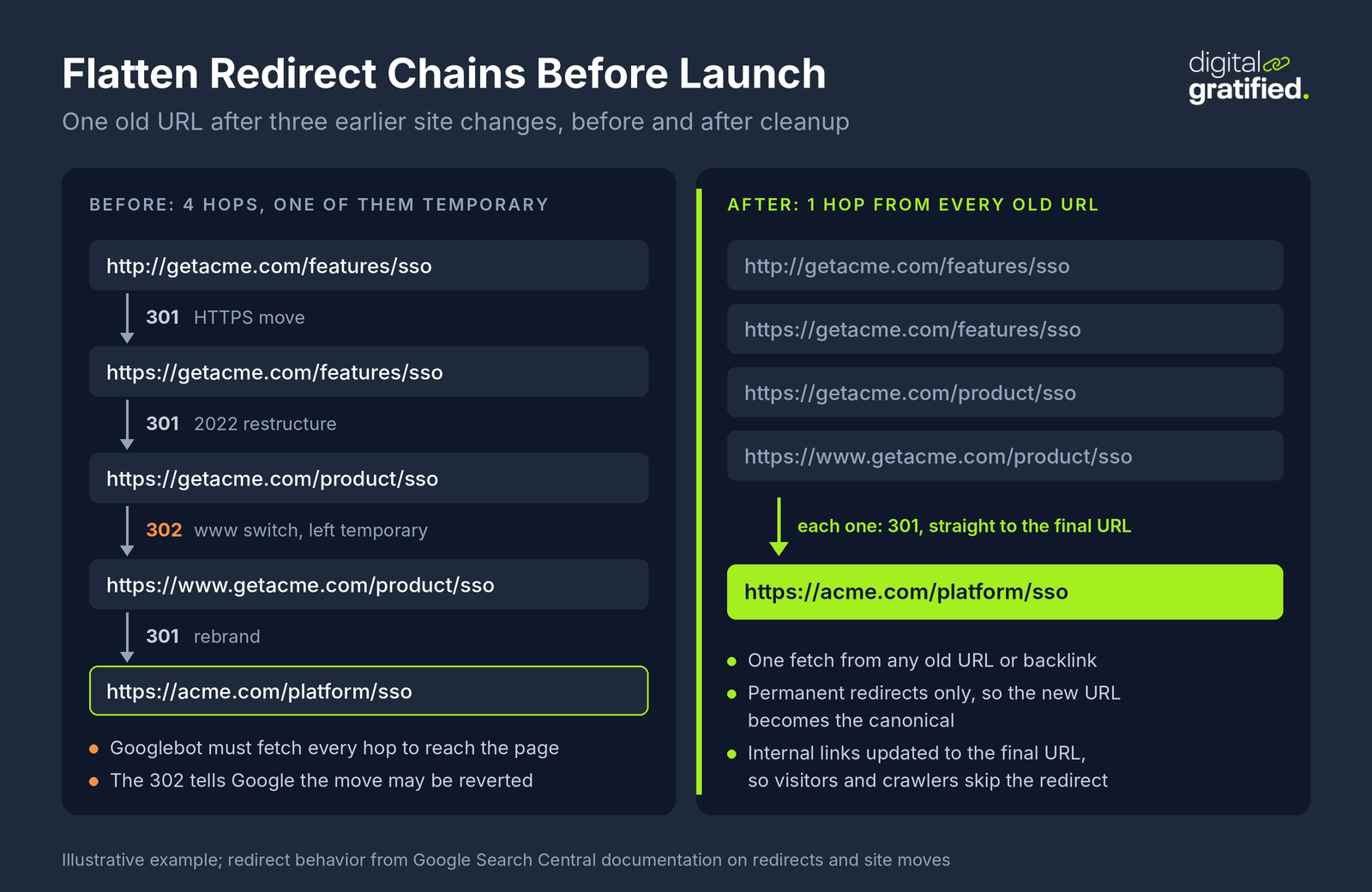
The classic failures are mass redirects to the homepage, temporary redirects left in place, and chains that stack a new redirect on top of the ones from the last three site changes. Google's redirect documentation is clear on the type: permanent redirects (301 and 308) tell Google the target is the new canonical URL, while temporary ones (302, 303 and 307) leave the old URL eligible to stay in results. Server-side redirects are the most reliable kind. JavaScript redirects are a last resort, because if rendering fails Google may never see them.
Lost Internal Links and Template Changes
A new navigation that drops the integrations menu, or a slimmer footer that no longer links to comparison pages, removes the internal links that told Google which pages matter. The URLs survive, the redirects work, and rankings still slide because the page lost half its internal authority. Audit the new templates against your current internal link architecture before launch, not after.
Content That Quietly Disappears
Rebuilds strip content in small ways: rewritten title tags, shortened intros, FAQ blocks left out of the new component library, structured data that never got ported. Bigger cuts happen when a team prunes 400 "old" blog posts during the move and takes out the supporting articles that held up a cluster's topical authority. Keep content and titles identical at launch and make editorial changes afterwards, when you can measure them.
Rendering and Indexing Blocks
The most expensive bug is also the most common: a staging robots.txt rule or noindex tag that ships to production. Close behind are canonical tags that still point at the staging host, and JavaScript frameworks that only render body copy in the browser. Google's site move page asks for a self-referencing canonical on every new URL and for any blocks used during the migration to be removed at launch.
How to Plan an SEO Migration: Rank URLs by Pipeline, Not Traffic
Most migration checklists prioritize URLs by traffic. On a SaaS site that is the wrong order, because the pages that bring visits (glossary entries, free tools, broad guides) are rarely the pages that bring demo requests. Before writing a single redirect, score every URL on three signals:
- Pipeline: organic-sourced demo or trial requests and opportunities over the last 12 months, attributed to the landing page in your CRM. These are the same numbers behind pipeline-focused SEO KPIs, so if you already track them, the data exists.
- Links: referring domains pointing at the URL, from Search Console and a third-party backlink tool.
- Search visibility: organic clicks and the queries the page ranks for in the top 20.
Those scores sort URLs into three tiers, and each tier gets a different level of care:
- Tier 1: every page with pipeline in the last year, plus pricing, product, integration and comparison pages. Map them one to one by hand, keep the slug where you can, keep titles and content unchanged at launch, and test each one on staging.
- Tier 2: pages with referring domains or steady clicks but no pipeline. Map them one to one to the closest equivalent, by script, with spot checks.
- Tier 3: pages with no pipeline, no links and almost no traffic. Redirect them to the closest relevant parent, and leave any decision to delete them until the move has settled.
Here is a worked example with illustrative numbers. A Series B SaaS company is moving from getacme.com to acme.com and from a hosted CMS to a headless build at the same time as the rebrand, with 2,300 indexable URLs. Ranking by pipeline shows that 46 URLs (2% of the site) produced 81% of last year's organic demo requests: the pricing page, 9 integration pages, 12 comparison pages, 6 use case pages and 18 blog posts. Those 46 get hand mapping and a staging test each. Another 610 URLs carry links or clicks and get scripted one to one mapping. The remaining 1,644 (tag archives, old release notes, thin event pages) go to their nearest parent. Because the domain and the platform are both changing, the team also freezes templates and content for tier 1 pages until the new domain has stable rankings, so that any drop points to one cause.
One more rule belongs in the plan: redirect every old URL straight to its final destination. Google's site move guidance advises "redirecting to the final destination directly", which means flattening the chains your site has collected from earlier moves, not just adding a new hop.
SEO Migration Checklist: Before, During and After Launch
Use this as the minimum. Large sites need more, but no migration should launch without these items signed off.
Before Launch
- Build the full URL inventory from a crawl, your XML sitemaps, Search Console's page reports, analytics landing pages and your backlink tool. Each source finds URLs the others miss.
- Record a baseline: tier 1 rankings, weekly organic demo and trial requests, indexed page counts and crawl stats.
- Finish the redirect map and review every tier 1 row with the page owner.
- Crawl staging and compare it with production for titles, H1s, canonicals, structured data, internal links and word count on tier 1 pages.
- Render key templates the way Googlebot does and confirm the body copy is in the rendered HTML.
- Protect staging with authentication, not only robots.txt, so nothing leaks into the index early.
- Pick a launch date with engineering on call for the following two weeks, away from quarter-end campaigns and product launches.
Launch Day
- Switch on server-side 301 redirects and test every tier 1 URL individually, then crawl the full old URL list for 200, 301, 404 and chained responses.
- Remove staging noindex tags and robots.txt blocks, and confirm self-referencing canonicals.
- Submit the new XML sitemap in Search Console.
- For a domain change, run the Change of Address tool for each verified variant of the old domain.
- Update every link you control: partner marketplace listings, documentation, review site profiles, social profiles, email signatures and paid campaigns.
After Launch
- Check Search Console's page indexing and crawl stats reports daily for the first two weeks, along with server logs for Googlebot errors.
- Compare tier 1 rankings and organic demo requests with the baseline every week.
- Ask the sites behind your strongest backlinks to update their links to the new URLs, and after a rebrand, start updating old brand mentions on the sites that cover your category.
- Keep the redirects in place for at least a year, and longer while old URLs still get visits. Google's Change of Address help page also recommends paying for the old domain for at least a year so nobody else can register it.
The obligations do not all expire together. Some run for months after the traffic looks normal again, which is where teams most often cut corners.
What Changes When a SaaS Site Migrates
Generic migration guides are written for ecommerce catalogs and publishers. SaaS sites fail in different places.
Rebrands and Domain Changes
A SaaS rebrand changes more than URLs. Review sites, integration directories, analyst write-ups and AI assistants all keep using the old name for months. Redirects carry link equity, but they do nothing for a buyer who asks an assistant about your old product name. Treat the old brand as a keyword you still need to own: keep a page on the new site that explains the change, and work through the third-party listings buyers read while they shortlist.
Moving Blogs and Docs Off Subdomains
Consolidating blog., help. and docs. subdomains into subfolders is one of the most common SaaS migrations, and teams often treat it as a content tidy-up. It is a full migration with its own redirect map, sitemap and monitoring. Keep logged-in app URLs out of scope entirely, and check that the docs platform you are leaving does not keep serving duplicate copies on the old subdomain.
Headless and JavaScript Rebuilds
Moving a marketing site to a JavaScript framework is where rendering problems hide. The page looks perfect in a browser while Googlebot receives a near-empty shell, or redirects are handled in client-side code that may never run for a crawler. Insist on server-side rendering or static generation for marketing pages and server-level redirects. The technical SEO audit we use for SaaS sites covers the rendering checks to run on staging.
Measure the Migration in Pipeline
Traffic is a lagging and noisy measure of a migration, because tier 3 pages can lose visits without costing a single deal. The question leadership cares about is whether tier 1 pages are back to their baseline rankings and whether organic demo requests are back to their pre-launch weekly run rate. Put both in a weekly post-migration report for the first three months, and only call the migration finished when both hold for a full month.
Who Should Own an SEO Migration
Every migration needs one person with the authority to delay launch if the redirect map or staging crawl is not ready. Without that, the launch date set by a rebrand agency or an engineering sprint wins every argument. If nobody in-house has run a migration before, it is worth bringing in someone who has: either a SaaS SEO specialist for the project or an agency that already knows your site.
Revenue-focused technical SEO audits are part of our SaaS SEO service, and a migration is the moment an audit pays for itself: it gives you the URL inventory, the baseline and the list of pages that produce pipeline before anything moves.
The Bottom Line
An SEO migration succeeds or fails before launch day. Rank every URL by pipeline, map the pages that produce demo requests by hand, flatten old redirect chains, and avoid bundling a domain change, a redesign and content cuts into one release. Then budget for the dip, because the typical domain migration takes most of a year to recover fully.
If a rebrand or replatform is on your roadmap, start the URL inventory and baseline now, while there is still time to change the launch plan. That is where a technical SEO audit for your SaaS site earns its keep.
Frequently Asked Questions
What is an SEO migration?
An SEO migration is the part of a site migration that protects search visibility when a site changes its domain, URLs, platform or templates. It covers mapping every old URL to a new one, setting up permanent redirects, carrying over titles, content, internal links and structured data, and monitoring Search Console until Google has replaced the old URLs with the new ones.
How long does an SEO migration take to recover?
Google says a medium-sized site can take a few weeks or more before the new URLs start showing in search. Full traffic recovery takes longer: in a dataset of 1,052 domain migrations, the median took 304 days to regain the old domain's organic traffic, and 13.9% had not recovered after three years.
Will a site migration hurt my rankings?
Expect some fluctuation; Google says any significant change to a site can cause it. The size of the drop depends on how much changes at once and on how well the redirects, internal links and content carry over. A domain change bundled with a redesign and content cuts carries the most risk, because nobody can tell which change caused a loss.
How long should I keep 301 redirects after a migration?
Google's site move guidance says to keep redirects for as long as possible, generally at least one year, and keeping them indefinitely is safest for visitors following old links. Google also recommends keeping the old domain registered for at least a year so nobody else can take it.
Do I need Google's Change of Address tool?
Only when moving from one domain or subdomain to another, such as a rebrand onto a new domain. It is not needed for HTTP to HTTPS moves, www to non-www switches or path changes on the same domain. When you use it, submit it for every verified variant of the old domain; its signal forwarding runs for 180 days.
Should I redesign my site and change domains at the same time?
Avoid it where you can. Google advises changing one thing at a time during a site move. Move the domain first with the old templates and content intact, then redesign, then prune content, leaving a few weeks of stable data between each step so any drop has one clear cause.
Is moving a blog from a subdomain to a subfolder an SEO migration?
Yes. Moving blog.example.com to example.com/blog changes the URL of every post, so it needs a full redirect map, a new sitemap, updated internal links and the same monitoring as any other migration. Prioritize the posts that produce demo requests or carry backlinks.
About the author
Let's Scale Your SaaS Together
Get a custom SEO and link building strategy tailored for your SaaS business.
Get SEO insights that actually move rankings
Link building tactics, case studies, and SaaS SEO playbooks. No fluff, no spam.
You're subscribed!
SEO and link building insights, straight to your inbox.