A prioritized diagnosis of SaaS SEO mistakes: spot crawl blockers, intent gaps, weak content and measurement problems, then choose a fix your team can verify.

Founder, Digital Gratified
Some SaaS SEO mistakes cost far more than others. A crawl blocker can hide your best page, an intent mismatch can attract visitors who will never start a trial, and a stale article can waste a page that already earned visibility. Fixing them in the right order matters as much as fixing them at all.
That's why SEO matters for SaaS only when the work connects search demand to a useful next step. A strong SaaS SEO strategy starts with the pages and searches tied to how buyers evaluate software, and this guide shows you which mistakes to tackle first.
How to Prioritize SaaS SEO Mistakes
Start with three levels. Blockers hide a page’s value. Pipeline gaps attract the wrong attention. Maintenance problems weaken pages that worked.
The order isn’t universal. A small startup may fix one high-intent page first; a larger site may need crawl controls.
For each issue, identify symptoms, consequence, fix, and verification.
Priority 1: Fix Blockers Before Polish
These blockers come before headline polish.
Mistake: Treating SEO as an Ownerless Side Project
SEO often starts as “something marketing should do.” Product owns releases, sales owns pipeline, and a writer publishes when there is room. Nobody owns the connection between a search opportunity, a page, and a business outcome.
Symptoms: Priorities change with every new keyword. Product pages wait for approval. Publishing volume is tracked, but no one can say which pages should generate trials or demos. The same technical issue appears in several audits because no team accepted it.
SaaS consequence: A buyer may find an educational article, return through a use-case page, and later share a comparison page. Without an owner, those touchpoints are optimized in isolation and the company cannot learn which organic visits support pipeline.
Fix: Give one person responsibility for the SEO backlog, even if execution is shared. Define one objective, then assign priorities to named owners in content, engineering, product marketing, or analytics. A clear SEO team structure needs decision rights, a review cadence, and a definition of done, not a large team.
Verify: For every item, identify the owner, affected page or query, and success metric. Review qualified organic conversions and page visibility, not just completed tickets.
Mistake: Letting Technical Health Slide
Technical SEO is easy to postpone because it sits between marketing and engineering. SaaS sites add app subdomains, JavaScript-heavy templates, gated documentation, trial flows, and frequent releases.
Symptoms: Important pages are absent from the index, links point to redirects or 404s, canonical URLs disagree, mobile pages are difficult to use, or a release changes rendered content. Slow pages and layout shifts go unnoticed in ranking reports.
SaaS consequence: If Google can’t crawl a solution, integration, comparison, or pricing page, it can’t contribute to acquisition. A poor mobile experience can lose a prospect before a demo form loads. Google’s page experience documentation places Core Web Vitals within broader experience signals, but a passing threshold can’t rescue an unhelpful page.
Fix: Start with revenue-relevant pages. Confirm status, indexability, one canonical URL, appropriate sitemap inclusion, and meaningful internal links. For a public marketing template, inspect rendered HTML and response headers for an accidental noindex and remove it when the page should rank. Keep robots.txt allowing crawlers to reach that URL, because a blocked crawler can’t see a noindex directive. Google’s guidance on blocking search indexing explains the distinction. Choose one canonical URL for variants and point internal links and the sitemap there. Don’t make an authenticated app or private documentation indexable. A focused technical SEO process for SaaS sites separates blockers from minor recommendations.
Verify: Compare intended and indexed URLs in a crawl and URL inspection workflow. Test key templates on mobile, inspect the live source and headers, record Core Web Vitals trends, and recrawl after deployment. Priority pages should remain crawlable, indexable, usable, and correct after the next release.
Priority 2: Match Pages to Buyer Intent
Once pages are findable, ask whether they deserve to rank.
Mistake: Chasing Keywords Without Understanding Intent
A keyword list is not a strategy. Search volume shows use, not whether someone wants a definition, template, shortlist, comparison, or product help.
Symptoms: One blog post targets informational and commercial variations. Briefs specify a keyword and word count but not the searcher’s job. Product pages chase broad terms while comparison and use-case pages are ignored. Traffic rises, but trials and demos do not.
SaaS consequence: A problem searcher may be months from selecting software; an integration or alternative searcher is evaluating now. Treating both alike creates weak paths and makes sales distrust technically “high-volume” organic leads.
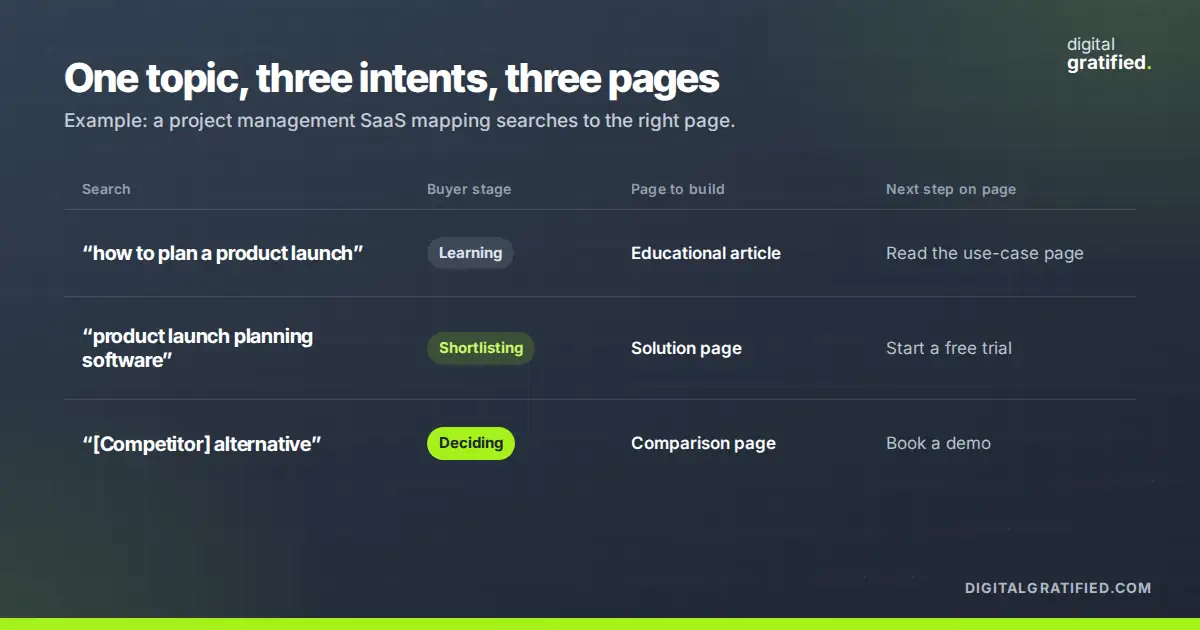
Fix: For each query, record the likely stage, underlying question, appropriate page type, and next action. Study current results without copying them. Build product, use-case, integration, comparison, and educational pages, with a specific buyer and job in every brief. For example, a hypothetical project management SaaS could map “how to plan a product launch” to an educational article, “product launch planning software” to a solution page, and “[Competitor] alternative” to a comparison page. Reserve capacity for lower-volume evaluation searches.
Verify: Group landing pages by intent and compare impressions, clicks, engagement, trials or demos, and qualified outcomes. Judge an educational page differently from a comparison page. If the audience is wrong, revise the target or promise instead of celebrating unusable traffic.
Mistake: Publishing Thin, Duplicate, or Generic Content
A short page isn’t automatically thin. Content is thin when it fails to answer a query with enough specificity, whether the page is long, duplicated, or generic. AI-assisted drafts can restate familiar advice without product knowledge or evidence.
Symptoms: Several slugs answer the same question. Product pages use interchangeable claims with no workflow detail. Articles summarize familiar advice but never resolve a practical decision. Output grows faster than subject-matter review.
SaaS consequence: Buyers can’t judge fit for their stack, team, permissions, use case, or constraints. Search engines have no reason to prefer one near-duplicate, while sales must answer questions the library should handle.
Fix: Consolidate overlap when one URL can serve the intent. Give distinct pages different audiences, use cases, or decisions. Add workflow steps, integration limits, configuration detail, and attributed evidence. AI can outline or find gaps, but a knowledgeable reviewer must correct claims. When distribution is missing, even useful work becomes a content marketing mistake: the right audience never sees it. An AI SEO for SaaS process should preserve editorial accountability.
Verify: Search for overlapping titles, canonicals, and repeated passages. Compare the page with sales, support, and product questions. Watch whether impressions consolidate, engagement improves for the intended audience, and assisted trials or demos become more relevant. Length alone is not success.
Priority 3: Connect Useful Pages to the Rest of the Site
Good pages underperform when no route connects them. Architecture shows which pages matter and what to do next.
Mistake: Leaving Architecture and Internal Links to Chance
Teams publish a strong use-case page, link to it once from navigation, and assume the job is finished. Older posts point to retired URLs, while new content links to the homepage. Important pages become practically orphaned.
Symptoms: A crawl finds few incoming links, click paths take irrelevant steps, related articles do not connect to solution pages, and anchors say “learn more” without explaining the destination.
SaaS consequence: Internal paths move a buyer from problem to use case to product or evaluation. Without them, a visitor restarts the search process and strong pages receive less context. That matters when a champion researches now and a decision-maker arrives later.
Fix: Map priority pages by topic and funnel role. Link relevant articles to the product, use-case, integration, or comparison page that answers the next question. Use descriptive anchors, repair changed URLs, and give each important page a path from a relevant hub. An internal linking strategy should follow user decisions, not arbitrary exact-match anchors.
Verify: Export incoming links for priority URLs. As a first-time buyer, follow the links from education to evaluation without guessing. Track indexed coverage, impressions, and assisted conversions. A larger link count proves little if the links aren’t relevant.
Mistake: Measuring Activity Instead of Outcomes
Analytics problems are rarely caused by a missing dashboard. Rankings, clicks, and sessions can move while the site attracts the wrong people or loses them at the form.
Symptoms: Search Console and analytics disagree without explanation. Conversions are not separated by landing page or intent. Forms lose the original landing page, trial activation is disconnected, and reports celebrate traffic without qualified pipeline.
SaaS consequence: A long consideration period creates multiple valid touches. Last-click reporting may credit a branded visit while hiding the educational page that introduced the account. Leadership can then cut useful work or fund attention with no sales conversations.
Fix: Define a chain from query and landing page to engagement, trial or demo, activation or qualification, and revenue where supported. Preserve landing-page context through forms and CRM handoff. Separate leading indicators from outcomes, annotate releases, and document attribution limits.
Verify: Submit a test conversion and follow it through analytics, CRM, and product or sales systems. Reconcile channel definitions, investigate missing landing data, and review cohorts by intent. If nobody can reproduce the report, it’s not a dependable audit tool.
Priority 4: Protect Gains You Have Already Earned
Maintenance matters when valuable pages lose visibility or the product changes.
Mistake: Letting Content Go Stale
Publishing is a starting point, not a guarantee that an answer stays useful. SaaS products change pricing, features, integrations, terminology, and limitations. An article that matched last year’s query may now omit expected decision criteria.
Symptoms: Screenshots show an old interface, links lead to retired features, examples use discontinued plans, rankings slip, and updates happen only after a complaint. Some pages earn impressions but no longer help the next step.
SaaS consequence: Prospects lose trust when an article contradicts the product, and customers may follow obsolete instructions. Sales then corrects marketing claims while a formerly valuable URL loses its place in the buying journey.
Fix: Build a refresh queue based on business value and change risk. Review pages tied to product capabilities, high-intent queries, or organic conversions more often than archive posts. Recheck intent, competitors, product facts, links, title, examples, and conversion path. Consolidate a page when it loses its distinct job, redirecting only to a genuine intent match.
Verify: Record impressions, clicks, ranking range, engaged visits, and conversions before the update. After recrawling, compare like-for-like periods and inspect manually. The update worked when the answer is accurate and the intended audience responds better, even if rankings take time to settle.
A Practical SaaS SEO Audit: What to Fix First
You don't need a full rebuild to find the highest-impact problem. Start with the highest-intent page that already gets organic impressions but no meaningful conversion. Put its URL into Search Console’s URL Inspection, record the index status and selected canonical, then use the steps below on that page before sampling the rest.
- Choose representative pages. Select a product or category page, use-case or integration page, comparison page, and two educational articles. Include one that gets traffic but doesn't convert.
- Check blockers. Confirm status, indexability, canonicalization, mobile usability, rendered content, performance, sitemap inclusion, and internal links. Fix an unindexable priority URL before producing content.
- Name buyer and intent. Write the query, searcher, funnel stage, page job, and next action in one sentence. If it's vague, the brief isn't ready.
- Test usefulness. Look for a workflow, use case, limitation, integration detail, or evidence a SaaS buyer can apply. Remove overlap and repair unsupported or stale claims.
- Follow the path. Move from education to evaluation, then from a commercial page to the explanation a cautious buyer needs. Repair dead ends and vague anchors.
- Trace a conversion. Submit a form or trial and verify that landing page, source, qualification, and downstream record survive the handoff.
- Assign ownership. Record action, owner, due date, expected signal, and result in one queue. Recheck after the relevant crawl, release, or measurement window.
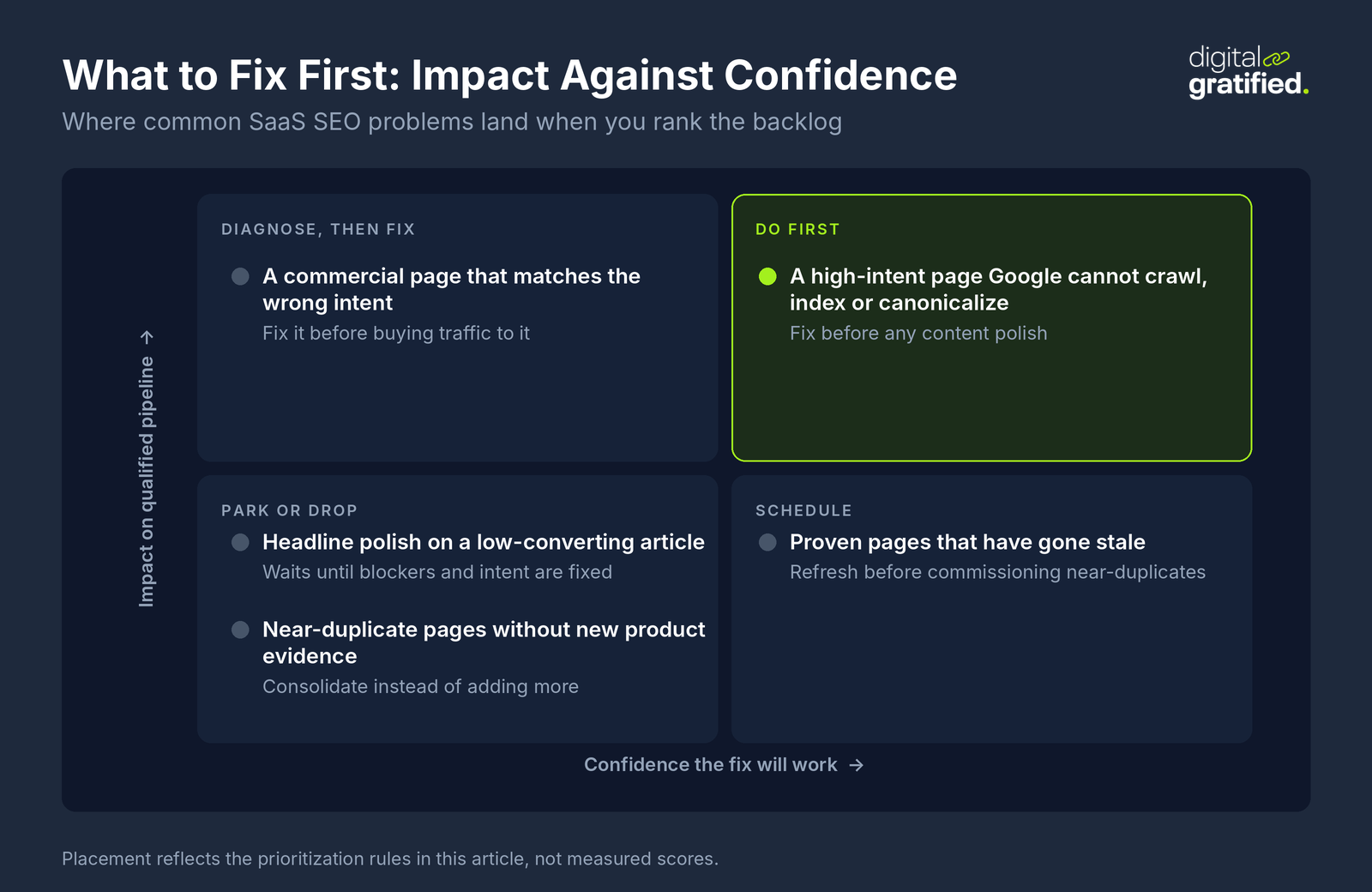
When several problems appear, use impact and confidence: fix a blocked high-intent page before polishing a low-converting article, and fix wrong intent before buying traffic. Refresh proven pages before commissioning near-duplicates.
An owner, engineering access, and reliable measurement may be enough to handle this in-house. Outside help is reasonable when a migration, multi-product site, or backlog exceeds capacity. If you outsource SEO, ask for page-level evidence, named owners, access boundaries, and a verification plan.
The goal isn't a spotless report. It's a site where the right pages are findable, useful, connected, and accountable to a measurable purpose.
About the author
Let's Scale Your SaaS Together
Get a custom SEO and link building strategy tailored for your SaaS business.
Get SEO insights that actually move rankings
Link building tactics, case studies, and SaaS SEO playbooks. No fluff, no spam.
You're subscribed!
SEO and link building insights, straight to your inbox.