Learn how to find competitor backlinks using free and paid tools, plus a prioritization framework to identify which opportunities are actually worth pursuing.

Founder, Digital Gratified
To find competitor backlinks, pull the referring domains of the pages that outrank you, run a link intersect to see which sites link to two or more competitors but not to you, and keep only the editorial links you could realistically earn. For a SaaS company, this works best at page level, against the specific pages that beat your comparison, use case and pricing pages.
Finding the links is the easy part. Deciding which ones are worth pursuing, and skipping shortcuts like link exchanges, is where the real work happens. This guide covers free and paid methods, what the main tools cost, how to read the strategy behind a competitor's links, domain and page-level analysis, how to track new links as they appear, and a framework for deciding what to chase first.
Why Competitor Backlink Analysis Actually Matters
Let's be clear about what competitor backlink analysis can and can't do:
What it CAN do:
Reveal websites that already link to content like yours (warmer leads)
Show you which link types work in your industry
Identify content formats that attract links
Uncover link building strategies your competitors use
What it CAN'T do:
Guarantee those sites will link to you
Replace the need for link-worthy content
Work as a complete link building strategy on its own
Think of it this way: competitor backlink analysis is reconnaissance, not a battle plan. It tells you where opportunities might exist, but you still need a strategy to capture them.
Free Methods to Find Competitor Backlinks
Start with what you can do without spending money. Free tools have real limitations, and we will be clear about them.
Ahrefs Free Backlink Checker
What it shows: A free preview of the top backlinks, referring domains and Domain Rating for any domain or URL
The good: Ahrefs runs one of the largest link indexes, and its free backlink checker describes its crawler as the second most active after Google's. Even a short list of top links can reveal patterns, like which content types attract links or which publications cover your competitors.
The limitations: It is a sample. A competitor with thousands of backlinks may have its best opportunities buried in the links the preview does not show, and you cannot filter deeply or export the full list.
Best for: Quick reconnaissance when you want a general sense of who links to competitors.
Moz Link Explorer (Free Version)
What it shows: 10 free queries per month with a free Moz account
The good: Moz's Domain Authority metric is widely used, so you can get a quick sense of link quality. The interface is beginner-friendly.
The limitations: 10 queries per month goes fast. If you have multiple competitors to analyze, you'll hit the limit quickly.
Best for: Checking a few specific competitors when you're just getting started.
Ubersuggest (Free Tier)
What it shows: Basic backlink data with limited daily searches
The good: More generous limits than some tools. Good for small businesses doing initial research.
The limitations: Smaller link data than the paid suites, and limited filtering options.
Best for: Budget-conscious research when you need more than a few queries.
Google Search Operators (Completely Free)
You can use search operators to find some links manually:
link:competitor.com: this used to work, but Google retired it years ago. Don't waste your time.
"competitor.com" -site:competitor.com: shows pages mentioning your competitor. Not backlinks specifically, but it reveals who talks about them.
The reality: Manual Google searching is time-intensive and incomplete. It's useful for finding a few opportunities but not for comprehensive analysis.
Paid Tools for Serious Backlink Research
If you're building links consistently, a paid tool earns its cost quickly. Here is what each offers, with entry prices from the vendors' own pricing pages.
| Tool | Entry price for backlink research | Competitor gap feature | Best for |
|---|---|---|---|
| Ahrefs | Lite at $129 a month (Standard $249, Advanced $449) | Link Intersect | Deep link data and page-level analysis |
| Semrush | SEO plan at $139 a month, or $117.33 a month billed annually | Backlink Gap | Teams that also use it for keyword research |
| Moz Pro | Standard at $99 a month, or $79 billed yearly; a $49 Starter plan | Link Explorer competitor comparisons | Smaller teams tracking a few competitors |
| Moz Link Explorer (free) | $0 with a free account | Limited | Spot checks on one or two competitors |
Prices change often, so confirm them on each vendor's page before you buy. Annual billing lowers all three.
Ahrefs (from $129/month)
Standout feature: Link Intersect finds the sites linking to your competitors but not to you. These are your warmest opportunities.
Best for: In-depth competitive analysis, especially at page level, when you need the most complete link data you can get.
Semrush (from $139/month)
Standout feature: The Backlink Gap tool compares your profile with up to five competitors at once and surfaces the domains that link to them but not to you.
Best for: All-in-one SEO needs. If you're already using Semrush for keyword research, the backlink tools integrate well.
Moz Pro (from $99/month)
Standout feature: Link Tracking Lists help you manage outreach to the prospects you find after the analysis.
Best for: Teams who want to track their link building progress in one place.
Which One Should You Choose?
If you're only buying one tool, Ahrefs or Semrush are the most complete. A workflow view of the best link building tools shows where each fits once the analysis turns into outreach.
The short answer: any of these tools will reveal more opportunities than you can realistically pursue. The bottleneck isn't finding backlinks: it's executing on them.
The Step-by-Step Process (That Actually Works)
Here's how to do competitor backlink analysis efficiently:
Step 1: Identify the Right Competitors
Not all competitors are useful for backlink research. You want:
Similar authority level: A startup analyzing Enterprise SaaS giants will find mostly unattainable links
Overlapping keywords: They should rank for terms you're targeting
Active link building: Some competitors have links from years ago but aren't actively building (less useful for finding current opportunities)
Start with three to five direct competitors, not 20. For a SaaS company, the best list usually comes from the search results themselves: the sites ranking for your most valuable comparison and alternatives terms, plus any category sites that keep appearing in software review roundups. Those are the competitors whose links are moving the rankings you care about.
Your search competitors are not always your sales competitors. A review site, a template library or a large publisher can outrank you for your best terms without selling anything you sell. Keep them on the list for this exercise, because their links explain the rankings even if they never show up in a deal.
Step 2: Export Their Backlink Data
In whatever tool you're using:
Enter competitor URL
Navigate to backlinks section
Switch to referring domains rather than individual backlinks, so one site with hundreds of sitewide links counts once
Filter for "dofollow" links (these pass ranking credit)
Sort by Domain Rating or Domain Authority (highest first)
Export to spreadsheet
Repeat for each competitor, and keep the exports in one sheet with a column for the competitor each link came from.
Step 3: Find the Overlap
Most tools have a "link gap" or "link intersect" feature. This shows:
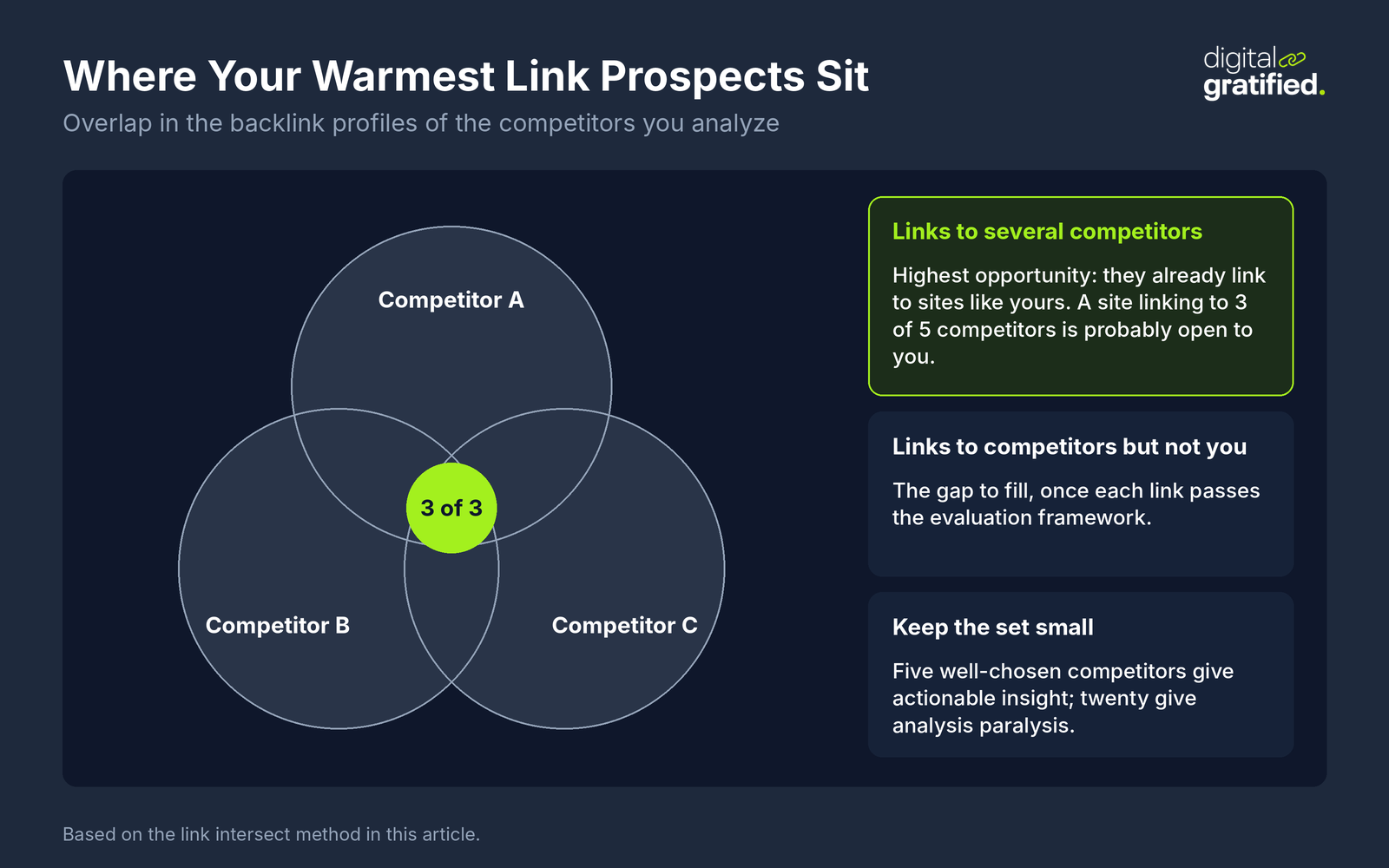
Sites linking to multiple competitors (highest opportunity: they clearly link to sites like yours)
Sites linking to competitors but not you (the gap you need to fill)
The overlaps are your starting point. If a site links to 3 of your 5 competitors, they're probably open to linking to you too.
Step 4: Read the Strategy Behind the Links
A list of referring domains tells you who links to a competitor. Grouping those domains by type tells you how the competitor builds links, which is the part you can actually copy or beat. Add a "link type" column to your sheet and tag each referring domain with what the linking page is.
| What you see in the profile | The tactic behind it | What to do about it |
|---|---|---|
| Many sites linking to one data page or report | Digital PR built on original research | Find the angle journalists picked up and publish a fresher or more specific dataset for your category |
| Bylined articles on industry blogs with an author bio link | Guest posting | Pitch the same publications with topics they have not covered yet |
| Partner directories, marketplaces and "integrations" pages | Integration and partner listings | List every integration you have on each partner's directory, and ask partners to feature joint use cases |
| Software review sites and "best tools" roundups | Review site profiles and roundup inclusion | Complete your review profiles and contact roundup authors when they next update the list |
| Podcast show notes and event speaker pages | Founder or expert visibility | Put your own subject experts forward for the same shows and events |
| Many links with the same keyword anchor from unrelated sites | Bought or networked links | Do not copy; note it as a risk in the competitor's profile |
Once the tags are in, sort by type and count. If most of the links that point at the page outranking your alternatives page come from software roundups, you know the fight is about roundup inclusion, not guest posts, and you can stop spending outreach time on the wrong tactic.
Domain-Level vs Page-Level Analysis: Which One You Need
Most guides stop at domain-level analysis: every link pointing anywhere on a competitor's site. That is the right view for overall strategy, because it shows which publications, directories and partner programs cover your category. But it mixes links to a competitor's blog, careers page and help center with links to the pages that compete with yours.
Page-level analysis answers a narrower and more useful question for a SaaS team: why does this specific page outrank ours? Enter the URL that beats your comparison or alternatives page, not the domain, and look at its referring domains. The gap between that page and yours tells you how many relevant links you need. Read it without overreacting to one outlier.
| Question | Domain-level analysis | Page-level analysis |
|---|---|---|
| What it shows | Every site linking anywhere on the competitor's domain | The sites linking to one URL that outranks yours |
| Best for | Building a long list of publications, partners and directories in your category | Closing the gap on a specific comparison, use case or pricing page |
| Main risk | Chasing links to pages that have nothing to do with your buyers | A sample too small to show patterns if you only check one page |
| What to do with the result | Prioritize with the tier framework below | Earn links to a linkable asset and pass authority to the page through internal links |
Use both. Run the domain-level intersect once a quarter to refresh your prospect list, and run page-level checks whenever a commercial page stalls between positions five and twenty.
The Evaluation Framework (The Part Most Guides Skip)
Finding backlinks is step one. Deciding which to pursue is where strategy happens.
Not all backlinks are worth chasing. Use this framework to prioritize:
Tier 1: High Priority (Pursue First)
Characteristics:
Domain Rating/Authority 50+
Links to multiple competitors (proves they link out in your space)
Contextual links within content (not directories or footers)
Topically relevant to your business
Has clear outreach path (contact info, guest post pages, etc.)
Why prioritize: These are proven link sources with high value and reasonable acquisition likelihood.
Tier 2: Medium Priority (Pursue Second)
Characteristics:
Domain Rating/Authority 30-50
Links to one competitor
Relevant but not perfectly aligned to your content
Might require content creation to match their linking patterns
Why they're second: Still valuable but require more effort relative to outcome.
Tier 3: Low Priority (Only If Resources Allow)
Characteristics:
Domain Rating/Authority under 30
Unclear how they acquired the link
No obvious outreach path
Marginally relevant to your content
Why deprioritize: Time spent here could be better invested in Tier 1 and 2 opportunities.
Links to Skip Entirely
Paid link directories: These are often low-quality or penalized
Sitewide footer links: Little SEO value, often look spammy
Links from unrelated sites: A cooking blog linking to your B2B SaaS? Probably not valuable
Exact match anchor text patterns: If every link uses the same keyword anchor, it might be a manipulative pattern you don't want to replicate
From Analysis to Action: What Comes Next
You've found opportunities. Now what?
For Guest Post Opportunities
If competitors got links through guest posts:
Study the content format that got published
Identify topics they haven't covered yet
Pitch with a specific angle and outline
For Resource Page Links
If competitors appear on resource pages:
Make sure you have a comparable resource to offer
Reach out to suggest your addition
Explain why your resource adds value for their readers
For Editorial Mentions
If competitors get mentioned in articles:
Build relationships with those publications over time
Create newsworthy content or data they might cover
Consider whether journalist request services that match reporters with expert sources could help
For Broken Link Opportunities
If you find dead links pointing to competitors, use broken link building:
Create content that matches what the dead page covered
Reach out suggesting your content as a replacement
Competitor Links You Should Not Copy
A competitor's profile shows what they did, not what was safe. Some of those links were bought, swapped or built through networks, and copying them copies the risk. Google's spam policies list "buying or selling links for ranking purposes", "excessive link exchanges" and low-quality directory or bookmark links as link spam, so treat those patterns as warnings rather than opportunities.
Two recent developments are worth knowing. Google's September 2026 spam update rolled out from September 24 to October 8, 2026. Google said at launch that it does not target link spam, so a competitor's sudden drop in that window is probably not about its links.
And Google's John Mueller said the disavow tool "has its place & time" and "does have effects". If your own profile already includes links copied from a competitor's paid placements, that is the case where disavowing makes sense; for the random low-quality links every site collects, it does not.
A simple test before you add a prospect: would the link exist if no money or favor changed hands? If the answer is no, skip it, however well it seems to work for the competitor.
How to Track New Competitor Backlinks
A one-off export goes stale fast. The most useful competitor links are often the newest ones: a roundup that was just updated, a journalist who just covered your category, a partner page that just went live. Those are the moments when an editor is still working on the page and open to adding one more product.
Set it up once and keep it light:
Alerts on three to five domains: Most paid suites can email you when a tracked domain gains new referring domains. Point the alerts at the same competitors you chose in step 1, not at every company in your market.
A weekly triage of 15 minutes: Skim the new links, tag each one with the link type from step 4, and move only Tier 1 and Tier 2 prospects into your outreach list.
A quarterly full refresh: Rerun the intersect so lost links drop out and new overlaps appear.
Unlinked mentions alongside links: Track where competitors are named without a link too. The same pages often mention you, and turning unlinked brand mentions into links is usually the easiest win on the list.
What you are watching for is a change in tactic. If a competitor that relied on guest posts suddenly gains links from news sites, it has probably launched a data study, and you will want to know the angle before it becomes the default source in your category.
When DIY Makes Sense (And When It Doesn't)
Competitor backlink analysis is something anyone can learn. But executing on what you find is a different matter.
DIY Makes Sense When:
You're just starting and need to understand your competitive landscape
You have time but limited budget
You're targeting a small number of specific opportunities
You want to learn the process before potentially outsourcing
Getting Help Makes Sense When:
You've identified opportunities but can't execute at scale
Your team's time is better spent on other activities
You need consistent link building, not just occasional efforts
The gap between you and competitors is significant
There's no shame in either approach. What matters is being realistic about your capacity.
For a realistic look at what professional link building costs, check current link building pricing. And if you're specifically in the software space, use SaaS link building strategies that work for B2B companies.
Copying competitors is one of eight backlink tactics for SaaS sites.
Common Mistakes to Avoid
These are the patterns that waste the most time:
1. Analyzing Too Many Competitors
More data isn't always better. Five well-chosen competitors give you actionable insights. Twenty competitors give you analysis paralysis.
2. Chasing Every Link
Your competitor might have 5,000 backlinks. You don't need to replicate all of them. Focus on the 50-100 highest quality, most attainable opportunities.
3. Ignoring Context
A link is worthless without understanding why it exists. Did the competitor get it through a relationship? Paid placement? A unique piece of content? Context determines whether you can replicate it.
4. Skipping the Content Question
You can identify every link opportunity in your space, but if you don't have content worth linking to, it won't matter. Link building and content work together, and the common SaaS content marketing mistakes explain why most SaaS content never ranks.
5. Expecting Instant Results
Competitor analysis takes a few hours. Building the links you identify takes months. Set realistic timelines.
Putting It All Together
Competitor backlink analysis isn't complicated, but it requires discipline:
Choose the right competitors (similar authority, overlapping keywords, ranking for your commercial terms)
Analyze at both levels (domain-level for the prospect list, page-level for the pages that beat yours)
Use appropriate tools (free for reconnaissance, paid for comprehensive analysis)
Find the overlaps (sites linking to multiple competitors are your best opportunities)
Read the tactics (tag links by type to see how each competitor actually builds them)
Evaluate before pursuing (not all backlinks deserve your time, and some should never be copied)
Match tactics to opportunity type (guest posts, resources, editorial, broken links)
Track what is new (alerts and a short weekly triage keep the list current)
Be realistic about execution (finding links is easy; building them takes work)
The companies that win at link building aren't the ones who find the most competitor backlinks. They're the ones who systematically pursue the right opportunities, create content worth linking to, and execute consistently over time.
Start with the analysis, but treat it as the beginning. If you want the execution handled, our SaaS link building team earns editorial placements on DR 50+ publications through relationship-based prospecting, never PBNs.
The Bottom Line
Competitor backlink analysis is worth an afternoon every quarter and a few minutes each week, not a strategy on its own. Pull the referring domains of the pages that outrank yours, run an intersect to find the sites that link to several competitors, read which tactics those links reveal, and pursue the editorial links you could earn with content you already have or can build.
Then skip anything that only exists because someone paid or traded for it, and judge the work by whether your commercial pages move. A short list of the right prospects, worked consistently, beats a spreadsheet of every link your competitors ever got.
Frequently Asked Questions
How can I find my competitors' backlinks for free?
Use the free backlink checkers from the big SEO suites for a preview of a competitor's top links, a free Moz account for 10 Link Explorer queries a month, and Google searches for the competitor's brand name excluding their own site to find pages that mention them. Free tools show samples, so they are best for spot checks on a few competitors.
What is the best tool to find competitor backlinks?
Ahrefs and Semrush are the most complete. Ahrefs Link Intersect and Semrush Backlink Gap both show the sites that link to your competitors but not to you, which is the core of the analysis. Moz Pro is a lower-cost option for smaller teams tracking a few competitors.
What is a link intersect or backlink gap analysis?
It compares the referring domains of several competitors with your own and lists the sites that link to one or more of them but not to you. Sites that link to several competitors are the warmest prospects, because they already link to products like yours.
How can I see a competitor's link building strategy?
Export its referring domains and tag each one by the type of linking page: data studies picked up by news sites, bylined guest posts, partner and integration directories, review sites and roundups, podcasts and events. The type with the most links is the tactic doing the work, and that tells you where to compete.
How many competitors should I analyze?
Three to five. Pick the sites that rank for your most valuable commercial terms and sit at a similar authority level. More competitors add noise faster than they add useful prospects.
Should I copy every backlink my competitor has?
No. Skip paid directories, sitewide footer links, links from unrelated sites and anything that looks bought or swapped, since Google treats paid links and excessive link exchanges as link spam. Focus on editorial links from relevant sites you could earn with content you have or can build.
How often should I check competitor backlinks?
Refresh the full domain-level analysis once a quarter, and check page-level links whenever one of your commercial pages stalls below a competitor. Alerts for new competitor links, triaged weekly, help you spot fresh roundups and articles while they are still being updated.
About the author
Let's Scale Your SaaS Together
Get a custom SEO and link building strategy tailored for your SaaS business.
Get SEO insights that actually move rankings
Link building tactics, case studies, and SaaS SEO playbooks. No fluff, no spam.
You're subscribed!
SEO and link building insights, straight to your inbox.