Topics vs keywords is a false choice. Here is what each one decides on a SaaS site, a results-page test for whether two keywords share a page, our own Search Console data on queries per post, and a process for turning a keyword list into a topic map.

Founder, Digital Gratified
Topics vs keywords is a false choice: topics decide what a site covers and how its pages connect, and keywords decide what each page is called, whether it deserves to exist and how you measure it. Our position for B2B SaaS teams is to plan by topic, split pages by intent, and judge results by keyword and pipeline. Teams that drop keywords lose the only evidence they have of what buyers type; teams that plan only by keywords end up with ten thin pages where one strong page would rank.
Most pages that rank for this term argue that topics have replaced keywords and stop there. That is useful as a correction to keyword stuffing, but it skips the decisions a SaaS marketer makes every week: does this keyword get its own page, which page should a variant live on, and how do you report on a topic when your CRM records landing pages? This guide answers those with our own Search Console data, a decision rule for one page or two, and a worked example. It is one part of a SaaS SEO program planned around pipeline.
What Is the Difference Between Topics and Keywords?
A keyword is the exact phrase someone types or says to a search engine: "outsource seo," "seo outsourcing services," "how much does it cost to outsource seo." A topic is the subject those phrases are about, together with the questions a complete answer has to cover: what outsourcing SEO includes, who should do it, what it costs, how to pick a partner and how to measure the result.
The two work at different levels of a content plan. The table sets them side by side.
| Question | Keywords answer it by | Topics answer it by |
|---|---|---|
| What do buyers call this? | Showing the exact words and their monthly volume | Grouping the words under one subject |
| What should the page cover? | Listing the variants and questions people search | Defining the subtopics a complete answer needs |
| Does this need its own page? | Comparing the results pages of two searches | Placing the subject inside or outside an existing cluster |
| How do pages connect? | Rarely; a keyword list is flat | Hub and cluster pages linked by subject |
| How is progress measured? | Position, impressions and clicks per query | Combined clicks and demo requests across the cluster |
| What goes wrong when used alone? | Duplicate pages and stuffed copy | Vague pages that rank for nothing in particular |
Read the last row first. Each approach has a failure mode, and the fix for one is the other.
Why "Topics, Not Keywords" Is Only Half Right
The case for topics is strong. When Google introduced BERT in 2019, it said that 15 percent of the queries it sees every day are ones it has not seen before, and it asked searchers to let go of their "keyword-ese." No keyword list can contain queries that have never been typed, so a page written only for the phrases in a tool will miss many of the searches it could answer.
Google's own SEO starter guide points the same way. It says Google's language matching systems are sophisticated enough that you should not try to anticipate every variation, that "there's no magical word count target," and that keywords in a domain name or URL path "alone have hardly any effect" on ranking. Repeating one phrase does not help either. Google's spam policies define keyword stuffing as "filling a web page with keywords or numbers in an attempt to manipulate rankings," including "repeating the same words or phrases so often that it sounds unnatural."
But the same starter guide also tells you to "think about the words that a user might search for to find a piece of your content." Keywords are still the evidence. They tell you which subjects have demand, how buyers phrase the problem in your category, and whether a searcher wants a definition, a comparison or a price. A topic plan with no keyword data behind it is a list of subjects your team finds interesting, which is how SaaS blogs fill up with thought leadership nobody searches for.
One Page, Many Keywords: What Our Search Console Data Shows
The strongest argument for planning by topic is what happens after a page goes live: it ranks for far more queries than the one it was written for. We pulled 28 days of Search Console data for this blog to see how far. Among the 27 posts with at least 100 impressions in that period, the median post appeared for 24 different queries, and its single biggest query brought in only 36% of its impressions.
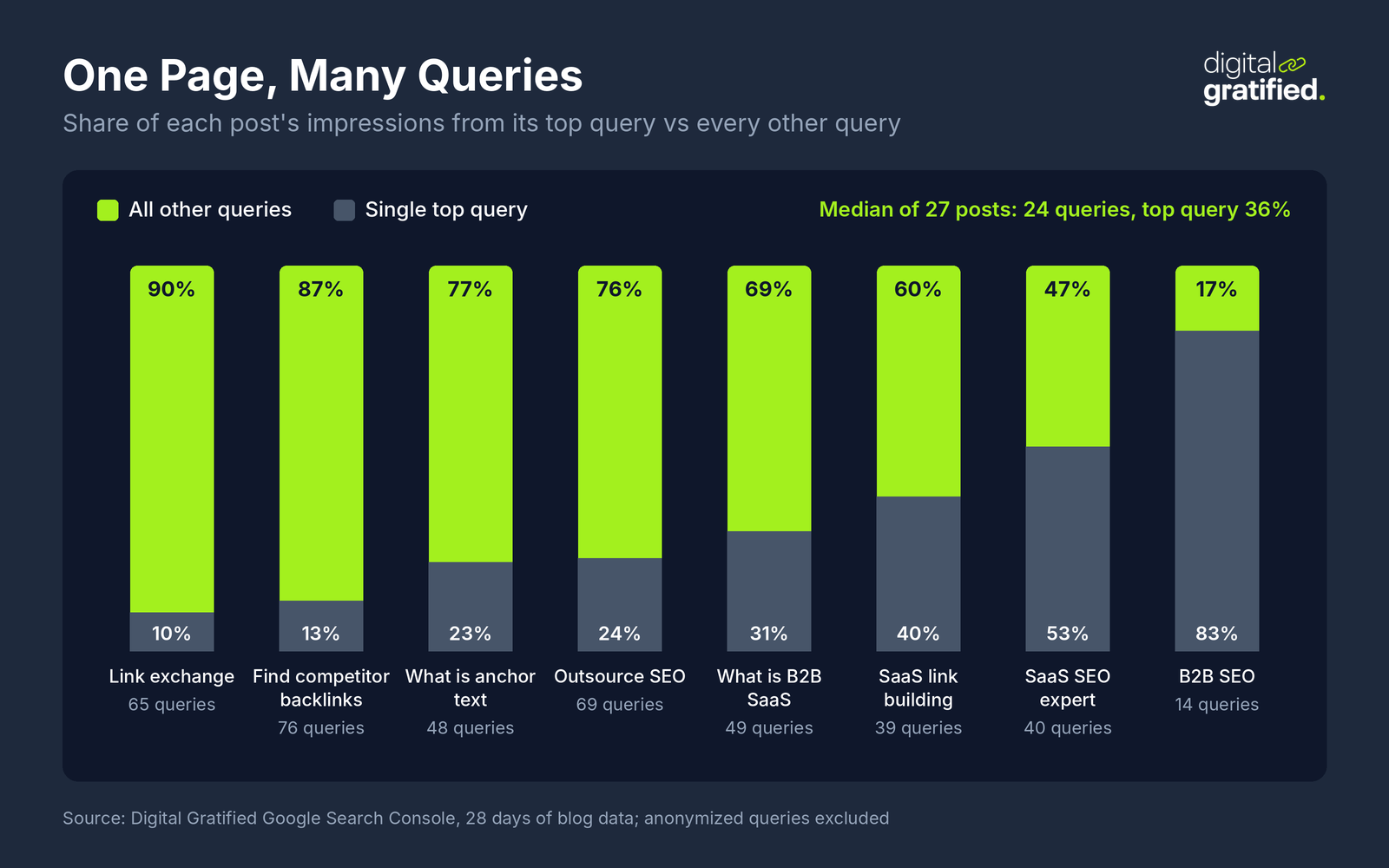
Two patterns stand out. Our guide to outsourcing SEO drew impressions from 69 queries, and its top four were "outsource seo," "seo outsourcing," "outsource seo services" and "outsourcing seo." Those are four keywords and one topic, and a team planning by keyword list could have written four pages that competed with each other. At the other end, our B2B SEO guide drew 83% of its impressions from a single query, which tells us its coverage is narrower than the subject it targets. That is a brief for the next update, not a reason to write another page.
Search Console also hides part of the picture: it leaves out rare queries to protect searchers' privacy, so the real spread of queries per page is wider than these numbers show. Outside data agrees with the direction. In a study of 3 million searches, Ahrefs found that the average page ranking first also ranks in the top 10 for nearly 1,000 other relevant keywords, with a median of about 400. The same study found that ranking first for more than one keyword above 10,000 monthly searches is very rare, which is the other half of the lesson: one page can hold many variants, but not many separate head terms.
How to Decide Whether Two Keywords Belong on One Page
The decision that matters most in practice is whether a new keyword gets a new page or a section on an existing one. Get it wrong one way and two of your pages split the same rankings; get it wrong the other way and one page tries to serve two searchers with different jobs.
We settle it with the results page, not the keyword tool. Search both terms and compare the top 10. When the same pages rank for both, Google has already decided they are one subject, and the second keyword belongs on the first page as a heading or a paragraph. When the results barely overlap, the searches are different and each needs its own page. Our working threshold is four or more shared URLs in the top 10, but treat it as a starting point and look at what the shared pages are: if the overlap is made up of directories and forums that rank for everything, ignore it.
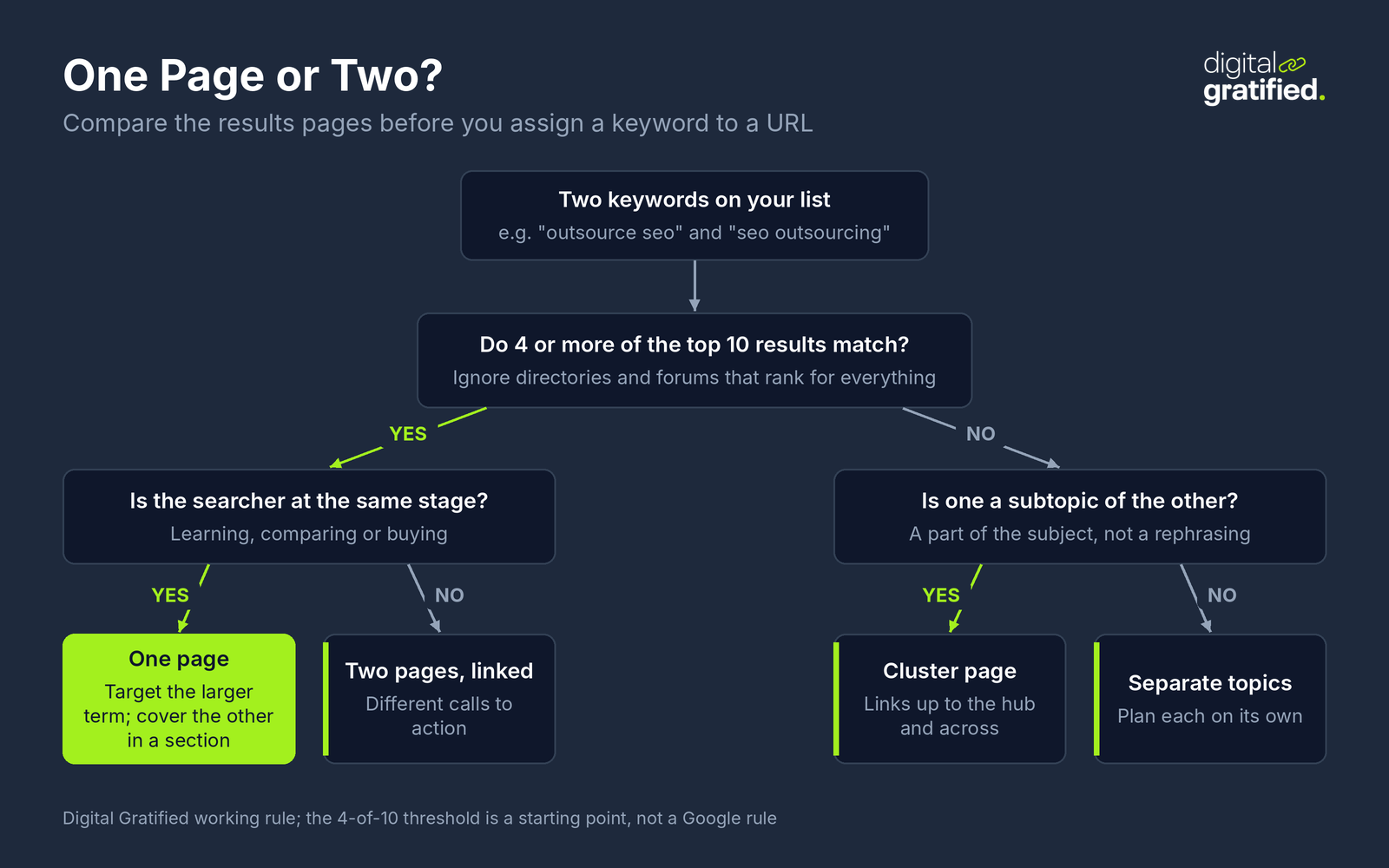
The second check is buyer stage. "Product analytics" and "product analytics tools" can share several results, but the first searcher wants to understand a category and the second wants a shortlist. On a SaaS site those are two pages with different calls to action, linked to each other. Intent beats overlap when the two disagree.
Topics and Keywords on a B2B SaaS Site
Different parts of a SaaS site need different mixes of the two. This is where most generic advice breaks down, because it treats every page as a blog post.
Commercial Pages Are Keyword-Led
Comparison, alternatives, integration, pricing and use-case pages exist to match one specific search: "[your product] vs [competitor]," "[competitor] alternatives," "[your category] for [tool they use]." The keyword defines the page, its title and its success metric, and the phrase is often too small for a keyword tool to show much volume. These pages convert because they match the searcher's words so closely. For how to structure them, see a landing page that has to rank and convert, and for which ones to build first, see the first pages a SaaS startup should build.
Educational Content Is Topic-Led
Guides, definitions and how-to posts should be planned by topic: one hub that covers the subject broadly and cluster pages that go deep on each subtopic, each linking to the commercial page it supports. Depth across a subject is what how a SaaS site builds and proves topical authority comes down to, and it is why ten guides on one problem do more for a young domain than forty posts across the industry. Plan those guides around content built around how B2B buyers form a shortlist, so each one leads somewhere a buyer can act.
Reporting Needs Both
Report clicks and demo requests by cluster, because a topic is the unit you invest in, and keep keyword positions underneath as diagnostics. A cluster whose demo requests are flat while one keyword drops tells you where to look. Building reporting by cluster rather than by keyword once, in your CRM and Search Console, saves the monthly argument about whether a ranking chart matters.
How to Build a Topic Map From Keywords
A topic map turns a flat keyword export into a plan with pages, links and owners. This is the process we use, and it works whether you start with 200 keywords or 2,000.
- Start from buyer language. Collect phrases from sales calls, demo forms, support tickets and your own Search Console queries before opening a keyword tool. The tool then sizes the demand instead of setting the agenda.
- Expand and filter. Pull variants and questions for each phrase, then drop anything a buyer would not search within a year of becoming a customer.
- Group by results page. Put keywords that share most of their top 10 results into one group. Each group is a candidate page, named after its largest term.
- Split by buyer stage. Where a group mixes learning and buying searches, split it into an educational page and a commercial page.
- Assign groups to topics. Gather the pages into clusters under a hub, and mark which commercial page each educational page should link to.
- Check what already exists. Map each group against your current pages. A group your site already ranks for gets a section on the existing page, not a new URL.
- Set one metric per cluster. Pick the demo or signup number each cluster is meant to move, and the two or three keywords whose positions you will watch as leading indicators.
The output fits straight into an SEO strategy template that starts from pipeline. Once pages are live, the links between them follow the map: cluster pages link up to the hub and across to the commercial pages, which is the logic of linking cluster pages up to their hub.
This is the same order we follow for clients. When we plan SaaS SEO, we start with buyer-intent keyword mapping and turn it into conversion-mapped keyword clusters and a content architecture, before any brief is written. You can see how that fits with our link building on our SaaS SEO and content work page.
A Worked Example: A Product Analytics SaaS
Here is a worked example with illustrative circumstances. A product analytics company has a keyword export of about 300 terms around "product analytics," "funnel analysis," "retention analysis" and "cohort analysis," plus a handful of competitor searches.
A keyword-first plan would assign a page to each of the 40 largest terms. Grouping by results page tells a different story. "Funnel analysis," "funnel analysis examples" and "how to do funnel analysis" share most of their top results, so they become one guide. "Funnel analysis tools" ranks mostly software lists and review sites, so it becomes a separate commercial page. "Retention analysis" and "cohort analysis" overlap on several results but serve different jobs for a product manager, so they stay as two guides that link to each other.
The result is four clusters (funnels, retention, experimentation and data governance), each with a hub, three to six guides and one commercial page, plus keyword-led comparison and alternatives pages for the two competitors prospects mention most. Instead of 40 pages, the company plans 26, and every guide links to the product page it supports. Its quarterly report shows demo requests per cluster first and the positions of each cluster's three leading keywords second.
Topics, Keywords and AI Search
AI search makes topic coverage more important without making keywords obsolete. AI Mode uses a query fan-out technique that breaks a question into subtopics and runs many searches at once on the user's behalf. A page that answers only the head term gives that process little to work with; a cluster that covers the subtopics in depth gives it several pages to draw from.
At the same time, much of the demand is invisible to keyword tools. Almost 93% of the keywords in one large US keyword database get fewer than 10 searches a month, and over 95% of conversational long-tail queries have no measurable search volume at all. You cannot plan for those one phrase at a time. You can cover the subject well enough that your page is the obvious source whichever phrasing a buyer or an assistant uses, which is also how a SaaS brand earns a place in AI answers as well as rankings.
Keywords still do the measuring. AI answers are hard to track one prompt at a time, so the keyword positions and Search Console queries for each cluster remain the steadiest signal you have, alongside KPIs that judge a topic by the demos it produces. If you compare rankings this month, use dates after November 24, when Google's November 2026 core update finished rolling out.
Where Each Approach Goes Wrong
Keyword-only planning fails in predictable ways. It produces a page for every variant, so "outsource seo" and "seo outsourcing" end up on two URLs that take turns ranking and neither wins. It rewards writing to a phrase rather than to a reader, which drifts toward the repetition Google's spam policies describe. And it hides gaps: a keyword list never shows you the subtopic nobody searches by name but every buyer needs answered.
Topic-only planning fails just as predictably. Pages get titles like "The Future of Data" that match no search. Clusters grow around subjects the team likes rather than ones buyers research. And reporting goes soft, because without keywords underneath, nobody can say why a cluster's traffic fell. The fix in both cases is the same order: keyword evidence first, topic structure second, intent to decide the pages, and pipeline to judge them.
The Bottom Line
Stop treating topics vs keywords as a choice. Use keywords to find demand and to decide pages, using the results page and the buyer's stage as the test. Use topics to decide coverage, clusters and internal links. Lead commercial pages with the exact keyword, plan educational content by topic, and report demo requests by cluster with keyword positions underneath.
If you want that map built and turned into pages that rank, talk to us about SaaS SEO built from keyword clusters to pipeline.
Frequently Asked Questions
What is the difference between topics and keywords?
A keyword is the exact phrase someone types into a search engine, such as "outsource seo." A topic is the subject behind a group of keywords, plus the questions a complete answer has to cover. Keywords show demand and phrasing; topics decide what a page or a cluster of pages should cover.
Should I target topics or keywords for SEO?
Both. Use keyword data to find demand and to decide which searches get their own page, then plan coverage and internal links by topic. Commercial pages such as comparisons and integrations should be built around one exact keyword, while guides and educational content should be planned as topic clusters.
How many keywords can one page rank for?
Usually many. In Ahrefs' study of 3 million searches, the average page ranking first also ranked in the top 10 for nearly 1,000 other relevant keywords, with a median of about 400. On our own blog, the median post with 100 or more impressions appeared for 24 different queries over 28 days.
How do I know if two keywords need separate pages?
Search both and compare the top 10 results. If they share most of the same pages and the searcher is at the same stage, cover both on one page. If the results barely overlap, or one search is for learning and the other for buying, give each its own page and link them.
Are keywords still important in SEO?
Yes, as evidence and as a measuring tool. Google no longer needs exact phrases repeated on a page, and its spam policies treat keyword stuffing as spam, but keywords still show what buyers search for, how they phrase it and whether a ranking is moving.
What is a topic cluster?
A topic cluster is a group of pages on one subject: a hub page that covers it broadly and cluster pages that go deep on each subtopic, all linked to each other. On a SaaS site, each cluster should also link to the commercial page it supports, such as a use-case or integration page.
Do topics matter more for AI search?
Coverage matters more. Google's AI Mode breaks a question into subtopics and runs many searches at once, so a cluster that covers a subject in depth gives it more to draw on than one page aimed at a head term. Keyword positions remain the steadiest way to measure progress.
About the author
Let's Scale Your SaaS Together
Get a custom SEO and link building strategy tailored for your SaaS business.
Get SEO insights that actually move rankings
Link building tactics, case studies, and SaaS SEO playbooks. No fluff, no spam.
You're subscribed!
SEO and link building insights, straight to your inbox.